CAFM Systems and Software: The Complete Guide

Walk into the basement of any large commercial building and you will find the real estate of facilities management: boilers, chillers, lifts, fire panels, air-handling units, all of it scheduled, serviced and logged somewhere. For most estates, that somewhere is a CAFM system. It is the database and the engine behind a building that mostly works, and it quietly decides whether a reactive fault becomes a two-hour fix or a two-day saga.
Quick answer: A CAFM system (computer-aided facility management) is software that helps an organisation plan, manage and track the physical assets, space and maintenance of its buildings. It centralises asset registers, space data, the maintenance help desk, planned and reactive work orders, and compliance records. Larger estates use CAFM to run engineering teams, control maintenance cost and prove statutory compliance from one system of record.
Key takeaways
- A CAFM system manages the building: space, assets, maintenance work orders, contractors and compliance. It is the operational backbone of an FM function.
- CAFM, CMMS and IWMS overlap but differ in scope: CMMS is maintenance-only, CAFM adds space and FM operations, IWMS adds the property and real-estate layer on top.
- The field-service mechanics inside CAFM (raising, assigning and closing work orders) are mature; the part that consistently lags is communication with the occupants and customers waiting on the job.
- The same market forces reshaping field service apply here: the field service management market is growing from USD 5.10 billion in 2025 to a forecast USD 9.17 billion by 2030, a 12.5% CAGR (MarketsandMarkets, 2025)
- You do not replace CAFM to fix the communication gap. You add an occupant-facing layer on top of the system you already run.
CAFM has been around long enough to be unglamorous, which is exactly why it matters. It is the system that knows where every asset sits, when it was last serviced, which contractor holds the contract and whether the annual fire-damper inspection is overdue. For a Head of FM running a hospital trust’s estate, a university campus or a national retail portfolio, that single source of truth is the difference between a managed estate and a guessed-at one.
This guide does two jobs on one page. It explains what a CAFM system is and the features that define it, and it covers how to choose CAFM software, because the person asking “what is CAFM?” this month is shortlisting vendors the next. Along the way it covers where CAFM sits against CMMS and IWMS, how CAFM handles field and engineering work, and the one gap most CAFM tools share: the people on the receiving end of the work can rarely see what is happening.
What is a CAFM system?
A CAFM system is software that supports the operational management of buildings and the facilities function that runs them — the assets, the space, the maintenance, the contractors and the compliance, all from a single, structured database. CAFM stands for computer-aided facility management, and the “computer-aided” part is the clue: the software does not run the building so much as give the people who do a coordinated view and a set of controls.
At its core, a CAFM system holds three things. First, an asset register: every serviceable item across the estate, with its location, age, service history and warranty. Second, space data: floor plans, room use, occupancy and the link between an asset and the space it sits in. Third, a maintenance and help-desk engine: the means to raise, assign, schedule and close the jobs that keep the building running, both planned and reactive.
For enterprise estates (a multi-site retailer, an NHS trust, a logistics operator with dozens of depots), that combination is what makes the function manageable. Without it, planned maintenance lives in spreadsheets, faults arrive by phone and email, compliance evidence is scattered, and nobody can say what it costs to keep a given building open. CAFM is the facilities management software layer that turns a portfolio of buildings into something you can actually operate.
One point worth fixing early, because it shapes the rest of this guide: a CAFM system is built to coordinate the operation — the FM team, the engineers, the contractors. The occupant in the meeting room with no heating, or the customer in a let unit waiting on a repair, is treated as the recipient of the work, not a participant in it.
Core features of CAFM software
CAFM software is defined by a recognisable set of modules. Not every system ships all of them, and the buyer’s job is largely deciding which matter for the estate in question. These are the features that earn their place.
Maintenance management: planned and reactive
This is the operational heart. CAFM handles planned preventive maintenance — the scheduled, recurring servicing that keeps assets healthy — and reactive maintenance, the faults that arrive unplanned. A capable system raises the work order, applies the right SLA, assigns it to an in-house engineer or a contractor, and tracks it to close. Done well, the planned side suppresses the reactive side, as our guide to planned preventive maintenance sets out.
The help desk and work-order management
Every reactive job starts as a request, and the help desk is where it lands. CAFM software logs the request, classifies it, applies the SLA clock, routes it to the right resource and tracks it to completion — the discipline covered in our guide to work order management. The quality of an FM operation is largely decided here: how cleanly a request becomes a completed, evidenced job.
Compliance and reporting
For regulated environments, this is non-negotiable. CAFM holds the statutory maintenance schedule, the certificates, the audit trail and the reporting that proves an estate is safe and legal: fire, electrical, gas, water hygiene, lifts. When an auditor asks for evidence, the answer is a report, not a scramble through filing cabinets.
Three more modules round out a full CAFM system:
- Asset and equipment management: the asset register every other module reports against, tracking each item’s location, condition, service history and remaining life so maintenance is prioritised by what matters and total cost of ownership becomes visible.
- Space and move management: mapping floor plans to occupancy and use, desk and room booking, and the moves, adds and changes when teams reorganise. For estates under pressure to rationalise property, this alone earns the licence fee.
- Contractor and supplier management: permits, SLAs, job allocation, performance and cost for the outsourced specialists most large estates rely on, so an external repair is as visible and accountable as an internal one.
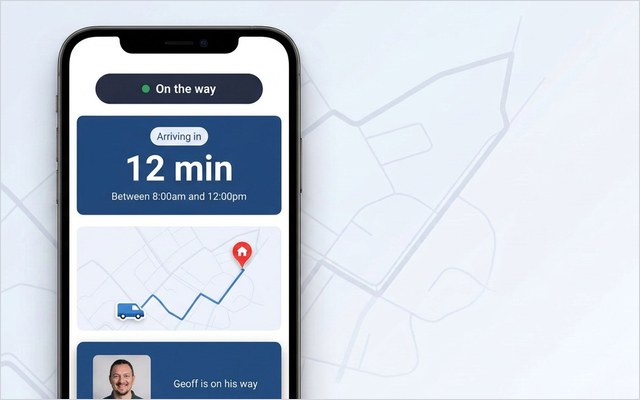
53% — the reduction in ETA-related calls to the contact centre that Bosch UK achieved after adding live tracking and self-service on top of the system already scheduling the work. The maintenance engine did not change; the occupants simply gained visibility.

CAFM vs CMMS vs IWMS
The acronyms overlap, which is why buyers get confused and vendors get to muddy the water. The cleanest way to separate them is by scope: each adds a layer to the one before it.
- CMMS (computerised maintenance management system) is the narrowest — maintenance only: asset registers, work orders, planned-maintenance schedules, spare parts and history. If the brief is “keep the equipment running and prove it”, a CMMS covers it. It does not typically manage space, leases or the wider FM operation.
- CAFM (computer-aided facility management) is broader. It includes the CMMS maintenance function but adds space and occupancy, move management, room and desk booking, the FM help desk and contractor management. CAFM runs the facility, not just its equipment.
- IWMS (integrated workplace management system) is the widest, wrapping CAFM-style FM operations together with real estate and property management: lease administration, portfolio strategy, capital projects and sustainability reporting. It is aimed at organisations managing property as a financial asset class.
In practice the boundaries blur — many CMMS products have added space features, and many CAFM systems now market themselves as IWMS. The useful question is not “which category is this?” but “what is the centre of gravity?” Here is the same comparison in one view:
| Capability | CMMS | CAFM | IWMS |
|---|---|---|---|
| Asset & equipment management | Yes | Yes | Yes |
| Planned & reactive maintenance | Yes | Yes | Yes |
| Work-order & help desk | Partial | Yes | Yes |
| Space & occupancy management | No | Yes | Yes |
| Move management & room booking | No | Yes | Yes |
| Contractor management | Partial | Yes | Yes |
| Real estate & lease management | No | Partial | Yes |
| Capital project & portfolio | No | No | Yes |
| Typical centre of gravity | Equipment uptime | FM operations | Property as an asset |
For most enterprise FM teams, CAFM is the right level: broader than pure maintenance, without the property-management weight (and cost) of full IWMS. The choice between CMMS and CAFM usually comes down to whether you need to manage space and the wider FM operation, or only the equipment.
How CAFM handles field service and maintenance
A CAFM system runs field and engineering work the way any field service management operation does — it just does it inside the building rather than out on the road. The lifecycle is the same: a reactive fault is logged at the help desk, or a job is raised automatically by a planned-maintenance schedule, and becomes a work order classified by priority and SLA. CAFM matches it to the right engineer or contractor (by skill, availability, location across the estate and the parts needed), slots it into the schedule, and the engineer attends with the job, asset history and any method statements on a mobile device, closing the record with the evidence compliance needs.

Two things make this harder than out-on-the-road field service. The first is the planned-to-reactive balance: a large estate runs a heavy programme of scheduled compliance work and an unpredictable stream of breakdowns, and the system has to hold both without the reactive flood swamping the planned discipline. The second is first-time fix. A repeat visit in FM is the same waste it is anywhere — the average field first-time fix rate sits at 76%, with top performers reaching 87% and the bottom quartile at 55% (Aquant Field Service Benchmark, 2024). The lever is the same: get the right person, with the right parts and asset history, to the job first time, which is largely what the asset register and mobile enablement exist to do.
So the engineering side is well covered: the right job reaches the right engineer, and the record proves it was done. The one thing a CAFM system almost never does is keep the person waiting in the loop while it happens.
The communication gap: occupants and customers can’t see the engineer
For all the sophistication inside a CAFM system, the people on the receiving end of FM work usually experience a black box. A facilities manager logs a fault; an occupant, a tenant or a retail-site manager waits, with no idea whether the job was accepted, who is coming, or when. So they do the only thing available: they chase. They ring the help desk, email the FM team, or escalate to whoever they can find.
This is the same dynamic that plagues field service generally, and the numbers are stark. Across enterprise service operations, 30–40% of appointments are changed by the customer and 10–15% are cancelled, with each change generating a roughly five-to-seven-minute call, usually after hours (On My Way internal research). That is the appointment problem in facilities form: every status the CAFM system already records (logged, assigned, en route, completed) is a status the person waiting would dearly like to see, and almost none of them ever do.
The gap is not a flaw in CAFM. It was built to coordinate engineers and contractors, and it does; it was never built to be an occupant- or customer-facing communication channel, and most products still are not. The result is a help desk carrying a heavy load of avoidable contact (“has anyone picked up my job?”, “when is the engineer coming?”), all of it answerable from data the system already holds.
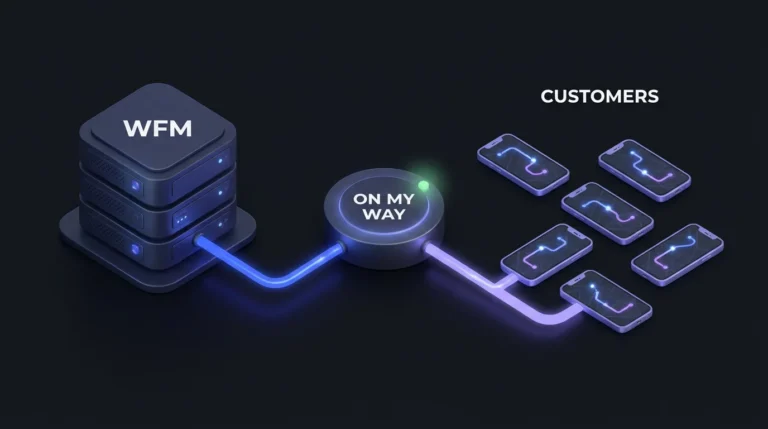
Closing the gap does not mean ripping out the CAFM system. It means adding the layer it lacks. A browser-based occupant portal (no app to install) can read the status changes the CAFM work order already produces and turn them into something the waiting person can see: a confirmation when the job is accepted, live tracking when an engineer is en route, automated SMS and email updates as the job progresses, self-service rebooking when the slot does not work, and a one-tap feedback request at close. This is what customer communication management software does. On My Way is built to be exactly that layer — it does not replace your CAFM or WFM, it adds the occupant-facing communication most never had, reading the same events, with no app for the end user and a four-to-six-week go-live. The automated notifications are the simplest place to start, or see how it works. The operation does not move; the experience does.
How to choose CAFM software
Choosing CAFM software is an exercise in matching the system to the estate, not chasing the longest feature list. The right tool for a single corporate HQ is rarely the right tool for a 400-site retail portfolio. A practical order:
Start with the estate, not the software. Map what you actually manage — number of sites, asset types and criticality, in-house versus outsourced engineering, the statutory compliance burden and the space-management pressure. The shape of the estate tells you whether you need CMMS, CAFM or IWMS before any vendor demo.
Weight the modules you will use. A compliance-heavy estate lives or dies by statutory scheduling and the audit trail; a retail estate leans on space and move management; a maintenance-led operation needs the planned-to-reactive engine above all. Score vendors on the modules that matter, and discount the ones you will never switch on.
Test the mobile and field experience. The engineers decide whether a rollout succeeds. If the mobile work order is clumsy, offline-hostile or slow, adoption fails and the asset data rots. Put the field app in front of the people who will use it before you sign.
Check the integration surface. A CAFM system that cannot talk to your finance system, your BMS or your existing WFM becomes another island. API-first systems that publish their work-order events are far easier to extend — including with the occupant-communication layer most CAFM products lack natively.
Be clear about cost. CAFM is typically priced per user, per asset, per site or per square metre, with implementation and data migration on top. The headline licence is rarely the real number; ask for total cost of ownership across three years, including the data migration that quietly dominates most projects.
Then ask the question vendors skip: what does the occupant or customer see while the work happens? If the answer is “nothing”, the cheapest way to close that gap is a self-service and notification layer on top, not a different CAFM system.
Getting started
For any FM leader weighing this up, the reassuring part is that improving the occupant side of facilities management is not the same project as replacing the CAFM system. Get the operational core right first — a clean asset register, a working planned-maintenance programme, a help desk that classifies and routes properly. Then look at what the people waiting on the work can see, where in most estates the honest answer is very little. Adding the occupant-facing communication layer is the highest-impact, lowest-disruption improvement available, because the same intervention that reassures the occupant also removes the chasing call from the help desk.
Keep your CAFM. Add the customer-facing communication layer it lacks. An efficient operation and a transparent experience were never really separate problems.
See it on your estate. On My Way adds real-time engineer tracking, self-service rebooking and automated updates on top of your existing CAFM or WFM — no app for occupants, no rip-and-replace. Book a demo or see how it works.
Related reading: reactive maintenance, PPM software and work order management software.
Frequently asked questions
What is a CAFM system?
A CAFM system — computer-aided facility management — is software that helps an organisation manage the assets, space, maintenance and compliance of its buildings from one structured database. It centralises the asset register, floor-plan and occupancy data, the maintenance help desk, planned and reactive work orders and contractor management, so a facilities team runs an estate from a single source of truth rather than from spreadsheets and email.
What is the difference between CAFM and CMMS?
A CMMS (computerised maintenance management system) manages maintenance only: assets, work orders, planned-maintenance schedules, spares and history. A CAFM system includes that function but adds the wider facilities operation — space and occupancy, move management, room booking, the FM help desk and contractor management. A CMMS keeps the equipment running; CAFM runs the whole facility. The choice comes down to whether you need to manage space and FM operations, or only the equipment.
What is the difference between CAFM and IWMS?
An IWMS (integrated workplace management system) is broader than CAFM. It includes CAFM-style facilities operations but adds real estate and property management — lease administration, portfolio strategy, capital projects and sustainability reporting. CAFM runs the building and its FM function; IWMS treats property as a financial asset class on top of that. Most enterprise FM teams find CAFM is the right level, with IWMS reserved for organisations managing large property portfolios.
How much does CAFM software cost?
CAFM software is usually priced per user, per asset, per site or per square metre, with implementation, data migration and training added on top. The right figure to ask for is total cost of ownership over three years, not the headline licence — data migration and configuration often dominate the real cost. Because pricing depends heavily on estate size and the modules you switch on, most vendors quote against a scoped requirement rather than publishing a price list.
Does a CAFM system tell occupants when an engineer is coming?
Rarely, and this is the most common gap. CAFM systems are built to coordinate engineers and contractors, not to communicate with the occupants, tenants or customers waiting on the work. The status changes the system records — logged, assigned, en route, completed — are usually invisible to the person who raised the job. Closing that gap means adding an occupant-facing layer on top: a browser portal with live tracking, automated updates and self-service rebooking that reads the same events the work order already produces.

The bottom line
A CAFM system is the operational backbone of facilities management — the system of record for assets, space, maintenance and compliance, and the engine that runs engineering work inside a building. Choose it by matching the modules to your estate, testing the field experience, and being honest about total cost of ownership. The one thing almost no CAFM system does well is tell the occupants and customers on the receiving end what is happening; that gap is fixable without replacing anything, by adding the communication layer on top of the system you already run.
References
- MarketsandMarkets — Field Service Management Market — Global Forecast to 2030 (2024). Market size USD 5.10B (2025) to USD 9.17B (2030), 12.5% CAGR
- Aquant — Field Service Benchmark Report (2024). Average first-time fix rate 76%; top performers 87%; bottom quartile 55%
- On My Way / Leadent Digital — enterprise deployment and “appointment problem” research (appointment-change volume; client outcomes).

Keep your WFM. Upgrade what your customers experience.
On My Way is the customer-experience layer for field service: live arrival tracking, self-service rebooking, notes and photos, and feedback, added on top of the scheduling system you already run. No rip-and-replace, live in four to six weeks.