On My Way for Salesforce Field Service
Salesforce Field Service is excellent at scheduling and dispatch — but its native customer portal is limited. On My Way adds self-service rebooking, real-time tracking, automated notifications and NPS feedback to Salesforce Field Service Lightning, with no custom development.
Trusted on enterprise field service operations
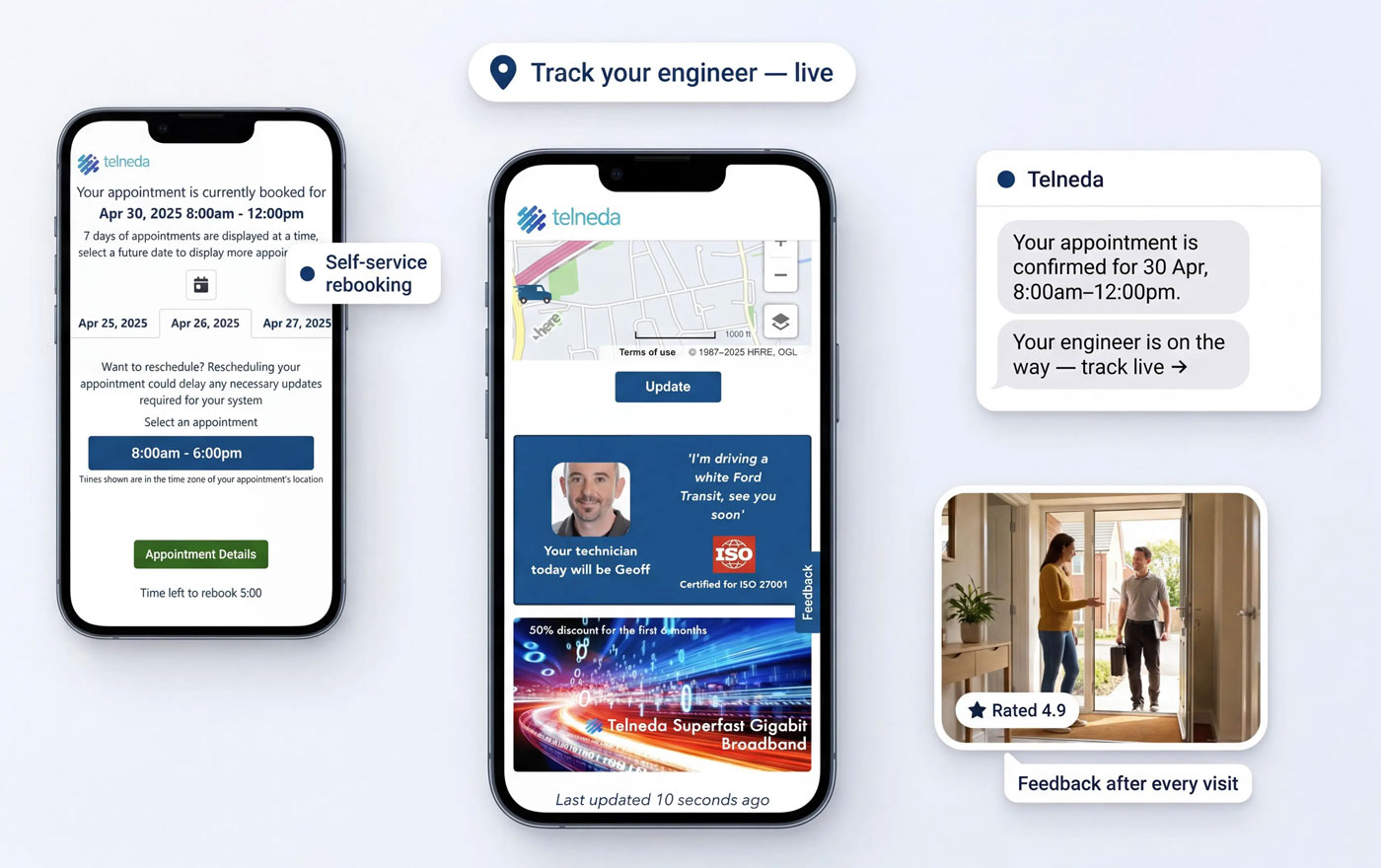
The On My Way customer experience, running on top of Salesforce Field Service Lightning.
The scheduling is great. The customer experience is the gap.
Salesforce Field Service Lightning (FSL) gives dispatchers powerful scheduling, optimisation and mobile workforce management. What it does not give your customers is a modern, self-service appointment experience — live technician tracking, easy rebooking, proactive SMS and email notifications, and a feedback loop on every visit.
The native Salesforce Field Service customer portal (Experience Cloud / Visualforce based) can show basic appointment details, but it is limited: no real rebooking with optimised slots, no in-appointment marketing, no NPS capture, and significant build effort to brand and maintain.
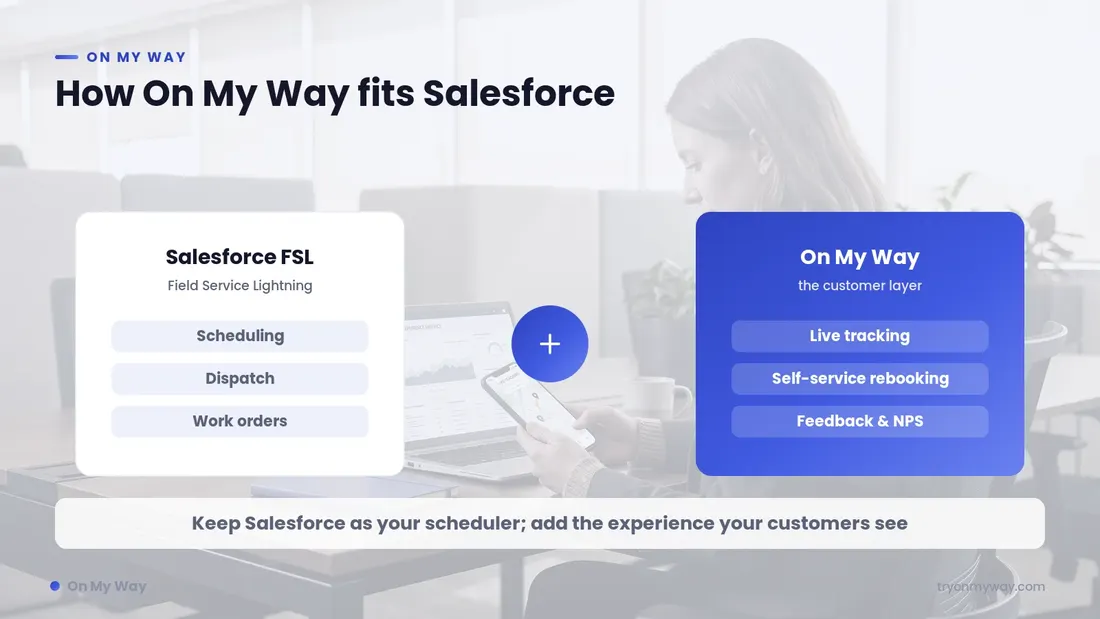
On My Way layers a purpose-built customer-communication experience on top of Salesforce FSL via API, so you keep your investment in Salesforce Field Service and close the customer-experience gap without rebuilding anything or replacing your scheduler.
See it in context
On My Way and Salesforce, side by side
Your dispatchers keep working in Salesforce Field Service exactly as they do today. On My Way reads appointment, work-order and technician-status data through the Salesforce API and turns it into a branded, real-time experience for the customer — no Salesforce mobile or console changes required.
Contact-centre agents get the same live appointment status the customer sees, so "where is my engineer?" calls are answered (or deflected) instantly, right alongside the Salesforce record.
What On My Way adds to Salesforce Field Service Lightning
Self-service rebooking
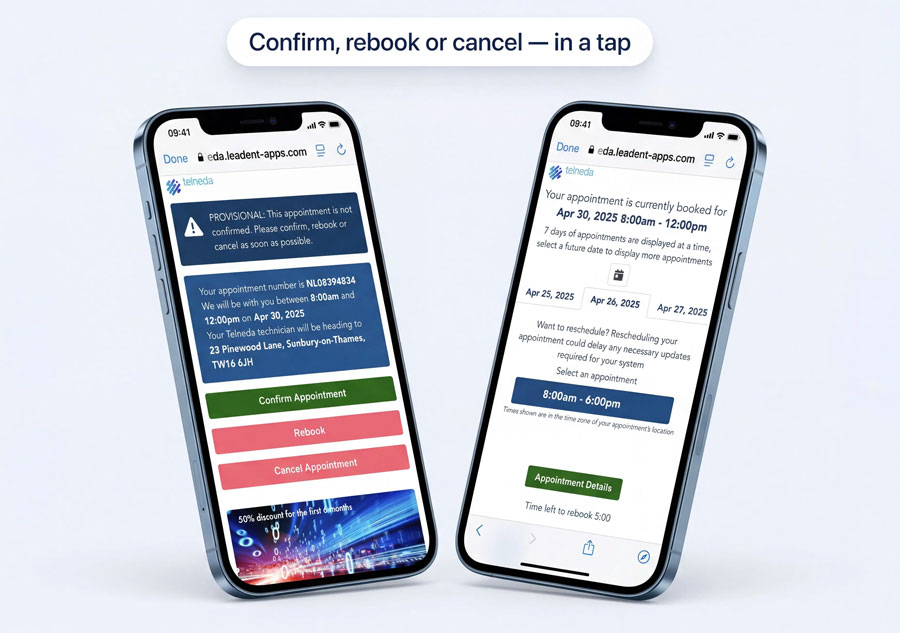
Customers move a Salesforce appointment to a greener slot themselves — cutting no-shows and inbound calls.
Real-time technician tracking
A live ETA and map driven by Salesforce FSL status, so customers stop calling to ask where the engineer is.
Automated notifications
Branded SMS and email confirmations and reminders that lift appointment attendance.
NPS & feedback capture
Measure satisfaction on every Salesforce work order, visit by visit, and feed it back to your team.
In-appointment marketing
Promote services, plans and offers inside the tracking experience your customers actually open.
Contact-centre view
Agents see the same live status as the customer, right alongside the Salesforce console.
How the Salesforce integration works
Connect via API
On My Way connects to Salesforce Field Service through its API — appointments, work orders and technician status sync automatically. No custom Apex development.
Configure your experience
Brand the customer tracker, set notification rules and rebooking windows, and choose exactly what data flows between Salesforce and On My Way.
Go live in 4–6 weeks
Launch on top of your existing Salesforce FSL setup — no rip-and-replace, no disruption to dispatch or the Salesforce mobile app.
Salesforce native customer portal vs On My Way
| Capability | Native Salesforce portal | On My Way |
|---|---|---|
| Live technician tracking & ETA | Limited | Yes — real-time, map-based |
| Self-service rebooking | Basic / build-your-own | Yes — optimised green slots |
| Branded SMS & email notifications | Add-on / custom | Built-in, fully branded |
| Appointment reminders & confirmations | Manual / flows | Automated, two-way |
| NPS & feedback per visit | No | Yes — every work order |
| In-appointment marketing | No | Yes |
| Write-back to Salesforce schedule | Custom Apex | Yes — native API |
| Contact-centre agent view | Console only | Yes — same live status |
| Multi-language / localisation | Build-your-own | Built-in |
| Branding & white-label | Heavy Experience Cloud build | Configured, no code |
| Custom development required | Apex / Visualforce | None |
| Time to deploy | Custom build | 4–6 weeks, configured |
| Call-deflection guarantee | None | 35% in 90 days |
Enterprise-ready, with zero disruption to Salesforce
On My Way reads from Salesforce Field Service through its API and never becomes your system of record — your Salesforce instance stays the source of truth.
SSO via Microsoft Entra ID
Single sign-on for your team, with role-based access to the On My Way console.
Passcode-protected access
Customer tracking links are passcode-protected, so appointment data stays private.
Encrypted in transit
All data moving between Salesforce and On My Way is encrypted end to end.
GDPR & works-council ready
Built to meet GDPR and European works-council requirements out of the box.
No custom Apex or Visualforce
Integration is configuration, not construction — nothing to build or maintain in Salesforce.
API-first, zero disruption
Dispatchers keep working in Salesforce FSL exactly as they do today.
On My Way for Salesforce Field Service: the essentials
- Works with Salesforce Field Service and Field Service Lightning (FSL) via API.
- Adds self-service rebooking, live tracking, notifications, NPS and marketing.
- No custom Apex development and no disruption to dispatch.
- Go live in 4–6 weeks with a 35% call-deflection guarantee in 90 days.
What enterprise teams see
Customer-facing metrics measured against pre-On My Way baselines. Verified by both parties.
Frequently asked questions
Does On My Way work with Salesforce Field Service Lightning (FSL)?
Yes. On My Way integrates with Salesforce Field Service and Field Service Lightning via API, syncing appointments, work orders and technician status. It adds the customer-facing layer that FSL does not provide out of the box.
Do I need custom Salesforce (Apex) development?
No. The integration is configuration, not construction — there is no custom Apex or Visualforce development required to go live.
Can customers reschedule their Salesforce appointment themselves?
Yes. On My Way offers self-service rebooking into optimised "green" slots, which writes back to your Salesforce Field Service schedule — reducing no-shows and inbound calls.
Does it work with the Salesforce Field Service mobile app?
Yes. On My Way sits on the customer side and reads technician status from Salesforce, so your engineers keep using the Salesforce Field Service mobile app unchanged.
How long does it take to go live?
Typically 4–6 weeks, layered on top of your existing Salesforce FSL deployment with no disruption to scheduling.
What data is shared between Salesforce and On My Way?
Only what is needed to power the customer experience — appointment times, technician status/ETA and work-order references. You control the data flows during configuration.
Is my data secure and GDPR-compliant?
Yes. Access is passcode-protected, data is encrypted in transit, and the deployment is built to meet GDPR and works-council requirements.
The guarantee
Hit 35% call deflection in 90 days — or we work for free.
Same system, same engineers, same work orders. We bolt On My Way on top, agree the deflection target with you, and if we don’t hit it inside 90 days we keep working without fees until we do.