Why a dedicated customer portal beats your FSM’s built-in option
Most field service management platforms include a basic customer portal. It is fine for looking up an appointment — but it rarely deflects calls, cuts no-shows or lifts CX. A dedicated field service customer portal adds the self-service, branding and feedback your built-in option leaves out, on top of any WFM.
Compared on enterprise field service operations
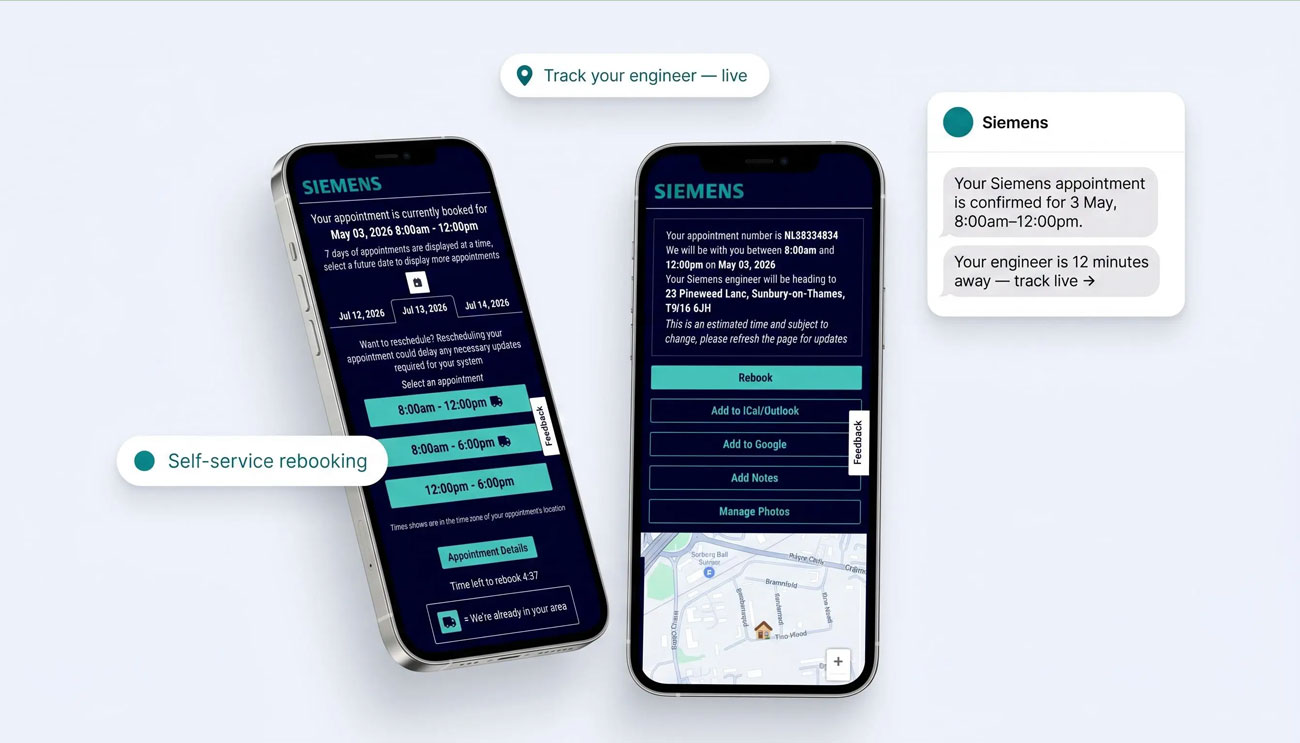
A dedicated field service customer portal, running on top of the FSM you already use.
The scheduling is built in. The customer experience is the gap.
Built-in FSM portals are designed as an add-on to the scheduler, not as a customer-experience product. Most are a configurable widget on a fixed template — operations- and dispatch-first, with customer comms bolted on as notifications. They typically show appointment details and a status, but stop short of true self-service rebooking, branded communications, feedback capture and marketing — and they only work inside that one platform.
The native gaps are documented, not opinion. Oracle Field Service’s “Where Is My Technician” is template-bound (a few fixed layouts), deeper customisation needs self-hosted plugins. Salesforce’s Appointment Assistant is a paid per-seat add-on priced on internal users, not customers served. Microsoft Dynamics 365 self-scheduling is still documented as preview, single-resource only, and cannot change in-progress appointments. Each is real native capability — but thin as a customer-experience product.
A dedicated layer is built the other way round: customer experience first, WFM-agnostic by design. On My Way reads from your FSM via API and adds the self-service experience customers expect, while your dispatchers keep working in the FSM exactly as they do today.
Built-in portal or dedicated layer?
What built-in portals do well
They are bundled with the FSM, need no extra vendor, and are fine for basic appointment look-ups inside that single platform.
What they share
Both can show appointment details and send some notifications. For low-volume, single-platform operations that may be enough.
Where a dedicated layer wins
Self-service rebooking, branded notifications, NPS, in-appointment marketing and a contact-centre view — across any WFM, with a 35% call-deflection guarantee.
WFM-agnostic by design
Your WFM
Any WFM
Keeps doing scheduling, dispatch and work orders — unchanged.
Middleware
On My Way
Syncs appointments via API and surfaces a branded customer layer.
Your customers
Self-service & tracking
Live ETA, rebooking, notifications and feedback — no app to install.
Built-in FSM portal vs On My Way
| Capability | Built-in FSM portal | On My Way |
|---|---|---|
| Primary focus | Basic appointment visibility inside one FSM | Dedicated customer self-service across any WFM |
| Real-time technician tracking & ETA | Varies; often basic | Yes — real-time, map-based |
| Self-service rebooking into optimised slots | Limited / build-your-own | Yes — optimised slots, writes back to WFM |
| Branded SMS & email notifications | Add-on / manual | Built-in, fully branded, two-way |
| NPS & feedback per visit | Rarely | Yes — every work order |
| In-appointment marketing | No | Yes |
| Configurable branding / white-label | Limited theme options | Fully configurable, no code |
| Contact-centre agent view | Within that FSM only | Yes — unified live status |
| Works across multiple WFMs | Locked to that vendor | Yes — WFM-agnostic |
| Survives a WFM change | Lost if you migrate | CX & data stay with On My Way |
| Custom development required | Often, to extend | None — configuration |
| Enterprise field service proof | Platform-dependent | Bosch, Foxtel, E.ON |
| Time to deploy | Varies | 4–6 weeks, configured |
| Call-deflection guarantee | None | 35% in 90 days |

WFM-agnostic advantage
Your customer experience should outlast your scheduler
A built-in portal ties your customer experience to one vendor’s roadmap and one platform. If you switch FSM or run more than one regionally, the experience fragments or disappears.
On My Way keeps the customer experience consistent and portable. It layers onto Oracle Field Service, IFS, Salesforce FSL, SAP, Dynamics 365 or ServiceMax via API — so you can standardise CX across platforms today, and keep it if you migrate tomorrow.
What On My Way adds over a built-in portal
Self-service rebooking
Customers move an appointment to a greener slot themselves — cutting no-shows and inbound calls, writing back to your WFM.
Real-time tracking & ETA
A live ETA and map so customers stop calling to ask where the engineer is.
Automated notifications
Branded SMS and email confirmations and reminders that lift attendance.
NPS & feedback
Capture satisfaction on every visit and route detractors to your team fast.
In-appointment marketing
Promote services, plans and offers inside the tracking experience customers open.
Contact-centre view
Agents see the same live status as the customer, deflecting “where is my engineer?” calls.
Upgrading from a built-in portal
Connect to your FSM
On My Way connects to your existing scheduler via API — appointments, work orders and technician status sync automatically. No rip-and-replace.
Configure your experience
Brand the customer portal, set notification rules and rebooking windows, and choose exactly what data flows.
Go live in 4–6 weeks
Launch alongside your built-in portal, then retire it — with no disruption to dispatch and a 35% call-deflection guarantee.
Enterprise-ready, with zero disruption to your FSM
On My Way reads from your FSM through its API and never becomes your system of record — your scheduler stays the source of truth.
SSO via Microsoft Entra ID
Single sign-on for your team, with role-based access to the On My Way console.
Passcode-protected access
Customer portal links are passcode-protected, so appointment data stays private.
Encrypted in transit
All data moving between your FSM and On My Way is encrypted end to end.
GDPR & works-council ready
Built to meet GDPR and European works-council requirements out of the box.
No custom development
Integration is configuration, not construction — nothing bespoke to build or maintain.
API-first, zero disruption
Dispatchers keep working in your existing FSM exactly as they do today.
Even best-in-class schedulers get a dedicated layer on top.
Here is the tell: operations running world-class enterprise schedulers such as IFS and Oracle Field Service still add a dedicated customer layer rather than rely on the native portal. Leadent Digital implements those platforms and builds On My Way on top of them — if the built-in portals were enough, the best-run FSM shops would not bolt a layer on.
On My Way runs on top of enterprise WFM platforms at scale. Across Bosch, Foxtel and E.ON deployments the dedicated customer layer delivers the outcomes below — using only each client’s own approved results.
53%
Bosch — ETA call reduction
38%
Foxtel — no-show reduction
19%
E.ON — first-time fix uplift
“
Our FSM’s built-in portal could show an appointment, but not much else. On My Way gave customers real self-service and our agents a live view — without changing how we schedule.
Head of Field Service Operations, enterprise HVAC provider
The verdict in four lines
- Built-in FSM portals are fine for basic, single-platform appointment look-ups.
- They rarely offer true self-service rebooking, branding, NPS, marketing or a contact-centre view.
- A dedicated, WFM-agnostic layer adds all of that and survives a future WFM change.
- Only On My Way backs it with a 35% call-deflection guarantee in 90 days.
The On My Way guarantee
Hit 35% call deflection in 90 days — or we work for free until you do.
We are confident enough in the field service customer experience to put our fee on the line.
Book a demo →Frequently asked questions
What is a field service customer portal?
A field service customer portal is the customer-facing layer of a field service operation — where customers track their appointment, see a live ETA, reschedule, get notifications and leave feedback. It can be the basic portal built into your FSM/WFM, or a dedicated layer like On My Way that adds full self-service on top of any scheduler.
Do I need a dedicated portal if my FSM already has one?
If you only need basic appointment look-ups, the built-in portal may be enough. If you want to deflect calls, cut no-shows and lift CX — self-service rebooking into optimised slots, branded notifications, NPS per visit, in-appointment marketing and a contact-centre view — a dedicated layer like On My Way adds what most built-in portals do not.
Does On My Way replace my FSM or WFM?
No. On My Way is WFM-agnostic and sits on top of your existing scheduler (Oracle Field Service, IFS, Salesforce FSL, SAP, Dynamics 365 or ServiceMax) via API. Your dispatchers keep working exactly as they do today.
What if we change FSM/WFM systems later?
With a built-in portal, your customer experience is lost when you migrate. With On My Way the customer experience and its data stay with you, because the layer is independent of any one platform.
Can customers reschedule themselves?
Yes. On My Way offers self-service rebooking into optimised “green” slots that writes back to your WFM schedule — reducing no-shows and inbound calls.
Is it secure and GDPR-compliant?
Yes. Access is via passcode-protected links, data is encrypted in transit, SSO is available via Microsoft Entra ID, and the deployment is built to meet GDPR and works-council requirements.
How long does it take to go live?
Typically 4–6 weeks, configured on top of your existing FSM with no disruption to dispatch — backed by a 35% call-deflection guarantee in 90 days.
Upgrade from your built-in portal
See the dedicated field service customer portal in action — on whatever FSM you already run, with a 35% call-deflection guarantee in 90 days.