What a Workforce Management System Does, and the Gap Every Platform Leaves
A large share of appointments change between booking and the knock at the door. The workforce management system that built the schedule usually hears about it by phone.
Quick answer: A workforce management system plans and runs a field service operation: it forecasts demand, builds schedules, optimises routes, dispatches engineers and records time and attendance. The major field-service platforms are Oracle Field Service, IFS, SAP, Salesforce Field Service, Dynamics 365 and ServiceMax, serving a market MarketsandMarkets values at USD 5.10 billion in 2025.
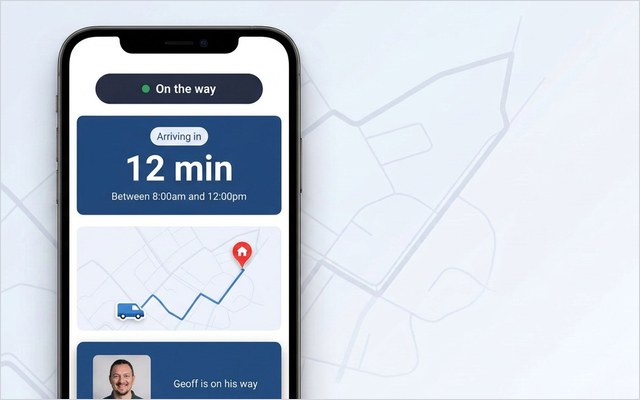
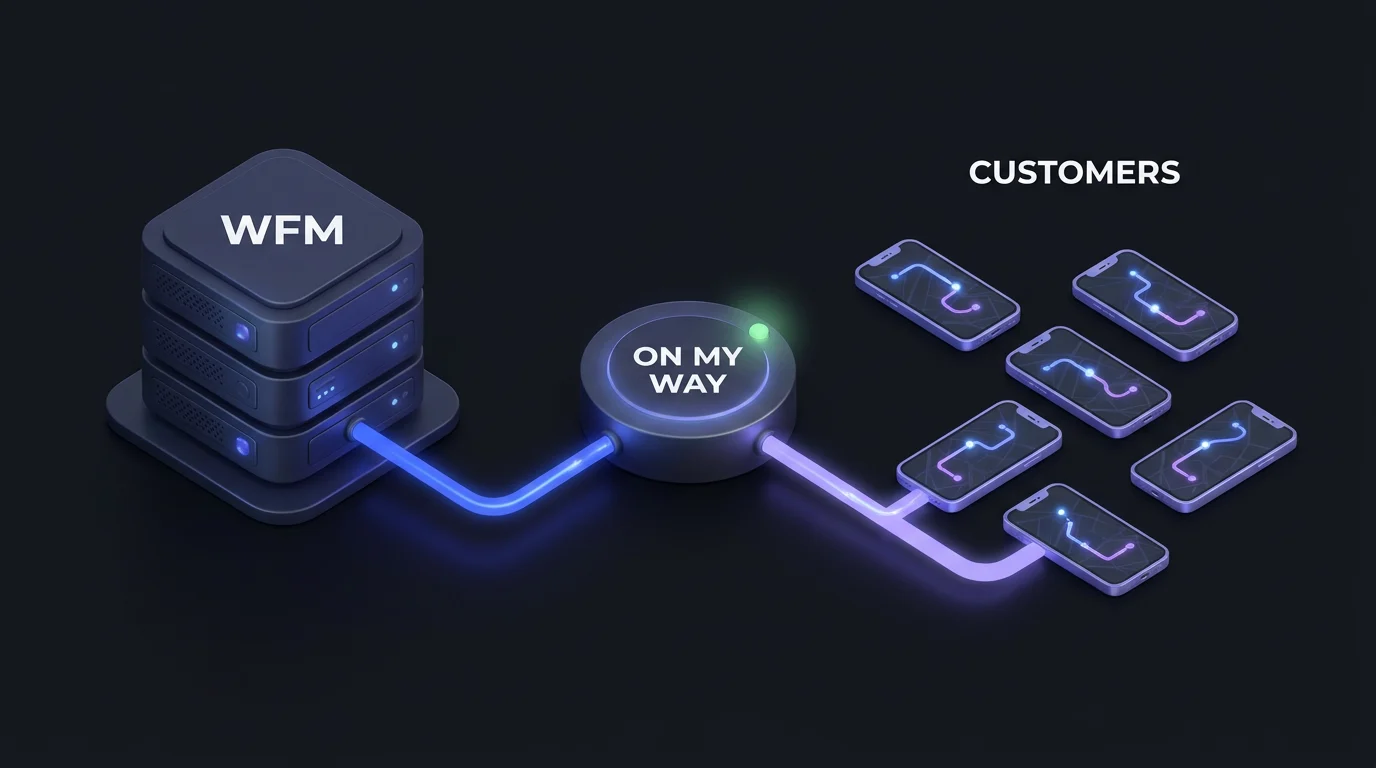
On My Way runs as a customer portal and notifications layer on top of IFS Field Service Management, SAP Field Service Management, Oracle Field Service, Salesforce Field Service, Microsoft Dynamics 365 Field Service and ServiceMax — the scheduling system stays, the customer experience is added on top.
Key takeaways
- A workforce management system forecasts demand, builds schedules, dispatches engineers and records time and attendance; it is the operational core of field service, not the customer interface.
- Six platforms dominate enterprise field service: Oracle Field Service, IFS, SAP, Salesforce Field Service, Microsoft Dynamics 365 Field Service and ServiceMax, in a category growing at 12.5% a year (MarketsandMarkets, 2025).
- The missing piece is structural: no major WFM system was designed to communicate with the customer at home, so appointment changes default to the contact centre.
- Enterprises close that gap by extending rather than replacing; layered deployments typically cut appointment-related calls by 30 to 40%.
- The approach is platform-agnostic: one global manufacturer runs the same customer layer on different WFM estates in the UK and continental Europe.
What is a workforce management system?
A workforce management system is the software that plans and runs a mobile workforce: it forecasts how much work is coming, builds the schedule, assigns and dispatches jobs, and records the time and attendance data behind payroll and compliance. In field service, it is the difference between 500 engineers guessing their day and 500 engineers following routes a machine has already optimised. Planners live in it, dispatchers work from it, and finance trusts it for utilisation numbers. At the scale this article assumes, 200 to 1,000 or more engineers and tens of thousands of appointments a month, nobody schedules by spreadsheet; the system is load-bearing infrastructure.
One disambiguation before going further. Workforce management software also describes contact-centre and retail tools; NICE, Verint and Calabrio schedule agents against call forecasts, which is a different problem wearing the same name. This overview covers workforce management in field service, where the scheduled person drives between properties and a shift is really a route with jobs pinned to it.
The category is large and compounding. MarketsandMarkets (2025) forecasts the field service management market growing from USD 5.10 billion in 2025 to USD 9.17 billion by 2030, a 12.5% annual rate, and the WFM engine is the scheduling heart of that spend. For how the engine sits inside the wider discipline of work orders, parts, contracts and customer communication, start with our guide to field service management.

The four functions every WFM system performs
Every WFM system performs four core functions: forecasting, scheduling, dispatch, and time and attendance. Vendors package and name them differently, but the anatomy is constant, and each takes on a distinctly field-service character when the workforce is mobile.
Forecasting
Forecasting predicts the work before it arrives. A UK heating operation knows what the first cold snap in November does to breakdown volumes; a utility models storm response; an appliance manufacturer watches the age profile of its installed base and the failure curves that follow. The forecast sets recruitment, contractor cover and overtime budgets months in advance. Miss it and you either pay for idle engineers in July or turn customers away in January.
Scheduling
Scheduling turns the forecast into an allocated plan: which engineer, which job, in which sequence. The engine weighs travel time, skills and certifications (Gas Safe registration, F-gas handling), SLA priority, shift patterns and parts availability, and the better ones re-optimise continuously as the day moves. Scheduling is a discipline with its own algorithms and trade-offs, and we cover it separately in our deep-dive on workforce scheduling in field service.
Dispatch
Dispatch is execution on the day. Jobs release to mobile devices, jeopardy monitoring flags the 10am overrun that will sink a 2pm SLA, and the system re-flows work when an engineer calls in sick at 7:45. Operations that promise two-hour arrival windows live or die by this function. Good dispatch is invisible; bad dispatch is a control room full of people shouting at a map.
Time and attendance
Time and attendance is the record: clock-on, travel time, time on site, overtime, working-time compliance and the feed into payroll. In field service it doubles as duty of care, because lone-worker check-ins often hang off the same data.
The major field-service WFM platforms
Six platforms account for the bulk of enterprise field-service WFM deployments: Oracle Field Service, IFS, SAP Field Service Management, Salesforce Field Service, Microsoft Dynamics 365 Field Service and ServiceMax. Each arrived at field service by a different route, and that heritage still shapes what each does best.
| Platform | Heritage | Recognised for |
|---|---|---|
| Oracle Field Service | Built on TOA Technologies, acquired by Oracle in 2014 | Predictive, time-based scheduling; high-volume domestic appointment books |
| IFS | Swedish ERP vendor; scheduling deepened by 360 Scheduling (2010) and Clevest (2020) | Planning and Scheduling Optimization engine; asset-intensive industries |
| SAP Field Service Management | Coresystems, acquired by SAP in 2018 | Field execution tied into SAP ERP processes; crowd-service model |
| Salesforce Field Service | Introduced on Service Cloud in 2016; ClickSoftware acquired in 2019 | Scheduling inside the CRM; breadth of partner ecosystem |
| Microsoft Dynamics 365 Field Service | FieldOne, acquired by Microsoft in 2015 | Power Platform extensibility; Teams and Outlook adjacency |
| ServiceMax | Founded 2007; part of PTC since 2023 | Asset-centric service for medical and industrial equipment |
Almost nobody buys from this list cold. An operation running 200 or more engineers usually owns one of these platforms already, several years deep, with integrations, customisations and trained planners attached. That installed reality frames every decision that follows, including the one this article is really about.
Deliberately, no ranking. The right WFM platform is mostly a function of the estate around it: ERP-led organisations tend toward SAP or IFS, CRM-led operations toward Salesforce or Dynamics 365, asset-heavy service toward ServiceMax, high-volume domestic books toward Oracle Field Service. What the six share matters more here than what separates them, and we document the connection detail for each in our integration guides for every major WFM system.
What workforce management software does brilliantly
Run well, workforce management software is exceptional at the operational side of field service: utilisation, route density, SLA compliance and first-time fix are levers it directly controls. An enterprise scheduling engine will hold together a day of 1,000 jobs across 40 postcodes through three motorway closures, and re-plan it before the kettle boils.
Benchmark data shows what that discipline is worth. Aquant’s 2026 Field Service Benchmark, drawn from 161 service organisations, puts the average first-time fix at 77%, with the best performers at 88% and the worst at 60%, and finds that failed visits account for a quarter of total service cost at the median. Getting the right engineer with the right part into the right slot is precisely the problem these platforms were built to solve, and the spread between 60% and 88% shows how much the tooling and its tuning matter.
Squeezing more from an installed system (sharper scheduling objectives, rebalanced territories, higher utilisation without burning out the workforce) is a practice in its own right, and our guide to workforce optimisation in field service covers it properly. The point for this overview is narrower: on its own ground, the modern WFM system delivers.
The WFM-shaped hole: what no workforce management system was built to do
No major workforce management system was designed to communicate with the customer at home, and the omission is architectural rather than accidental. A WFM engine models the resources it controls: engineers, vans, parts, shifts, skills. The customer is not a resource. In the data model, the customer is an attribute of a job (a name, an address, an access note), and nothing in the original design brief of any platform above asked the software to hold a two-way conversation with that person.
The consequence surfaces in the contact centre. When a customer needs to move Thursday’s appointment, the schedule that has to change sits inside the WFM system and the customer has no way to reach it, so they ring. Every change handled by phone is minutes of an agent’s time, and across tens of thousands of appointments a month that adds up to a permanent block of contact-centre workload that exists only because the schedule has no customer-facing surface.
Expectations moved while the category stood still. Salesforce reports that 80% of customers consider the experience a company provides as important as its products or services (State of the Connected Customer, 2024). Self-service preference tells the same story: a Harvard Business Review study found that 81% of customers try to resolve an issue themselves before contacting a live agent (Dixon, Ponomareff, Turner and DeLisi, Kick-Ass Customer Service, HBR, January 2017). A field service customer with no self-service route is not choosing the phone. They are defaulting to it.
The platforms have not ignored the customer entirely; most now offer booking confirmations, day-of text messages and basic tracking links. Salesforce’s Appointment Assistant and Oracle’s Where’s My Technician are typical of the breed: genuinely useful, largely one-way, and specific to their own platform. What none packages is the customer side as a product in its own right: white-label self-service rebooking, live tracking, real-time feedback and contact-centre visibility, consistent across estates and regions. That is the WFM-shaped hole, and it is the same shape on all six platforms.
Put your own numbers against the gap. A 30-minute working session, not a slide deck: bring monthly appointment volumes and we will map where the calls originate and what a customer layer on your WFM removes. Book the session, or walk the mechanics first on how On My Way works.

Extend, don’t replace: the enterprise pattern
The enterprise pattern is to keep the workforce management system and add a dedicated customer-communication layer on top. Replacing a functioning WFM estate to gain customer features means a multi-year programme, retraining, and operational risk in the one system the business cannot afford to wobble. Layering leaves scheduling, dispatch and mobile exactly where they are, and adds only what is missing. The WFM system remains the single source of scheduling truth; the layer reads from it and writes back to it rather than competing with it.
What the layer adds, concretely: SMS and email notifications (through Twilio, Boomerang or the Leadent SMS Gateway), live engineer tracking with a real ETA, self-service booking, rebooking and cancellation, and real-time NPS or CSAT capture, with optional extras such as in-appointment marketing and green appointment slots. A Contact Centre View shows agents exactly what the customer sees without consuming a WFM licence. The customer side is browser-based, nothing to install on a doorstep, and white-label throughout, so the customer only ever sees the provider’s brand. For IT, the checklist reads as it should: single sign-on through Microsoft Entra ID, role-based access control, encryption, regional data residency and GDPR compliance. Typical go-live is four to six weeks, with a six-week pilot for organisations that want evidence before commitment.
The strongest proof that the pattern is WFM-agnostic is one manufacturer running it in two regions on different underlying estates. Bosch UK, roughly 350 engineers handling around 1,100 appointments a day, recorded 53% fewer location and ETA calls and 79% higher customer engagement with appointment communications. Bosch’s continental European deployment, on a separate WFM estate, recorded 35% fewer ETA-related calls. The scheduling engines differ; the customer layer and the outcome pattern do not.
Commercially, the same de-risking logic applies. Leadent puts it in the contract: 35% fewer location and ETA calls within 90 days of go-live, measured against your own baseline, or we keep working without fees until it is. Typical deployments land between 30 and 40%; Bosch UK’s 53% sits above that band. Pricing runs per engineer, with an appointment-volume model for the largest estates, quoted against your fleet rather than published.
Related reading: enterprise service management, what a field service CRM holds and field service management software: the definitive guide.
Frequently asked questions
What is the difference between workforce management and field service management?
Workforce management is the narrower discipline: forecasting, scheduling, dispatching and recording the time of the people who do the work. Field service management is the end-to-end operation, adding work orders, parts and inventory, contracts, invoicing and customer communication. In most enterprises the WFM system is the scheduling core inside that wider landscape, which is why the terms get tangled.
Is a WFM system the same as workforce management software?
Yes, in practice the terms are interchangeable, with one caveat: workforce management software also covers contact-centre and retail scheduling tools from vendors such as NICE and Verint. In a field service context, a WFM system or WFM platform means software that schedules and dispatches mobile engineers, the sense used throughout this overview.
Do we need to replace our workforce management system to improve customer experience?
No. The customer-communication gap is common to every major platform, so swapping one WFM system for another does not close it. The proven enterprise route is to keep the incumbent system and add a dedicated customer layer above it, which typically reaches go-live in four to six weeks against the multi-year horizon of a WFM replacement.
Which workforce management systems does On My Way work with?
All the major field-service platforms: Oracle Field Service, IFS, SAP, Salesforce Field Service, Microsoft Dynamics 365 Field Service and ServiceMax. The layer is WFM-agnostic by design, which is how one manufacturer runs it across different estates in different regions, and the connection detail is documented per platform in our integration guides.
How is a customer layer priced alongside a WFM system?
Per engineer, as a recurring fee, with an appointment-volume model available for the largest estates. Figures depend on fleet size and appointment volume, so pricing is quoted rather than published; the fastest route to a number is a demo request with your engineer count attached. A six-week pilot is also available where the business case needs proving before a full rollout.
The bottom line
A workforce management system earns its keep on the operational side: forecasting, scheduling, dispatch, time. Judge it there, and judge the customer side as a separate question, because no platform in the category was built to answer it. That gap is structural, it is the same on every estate, and the proven response is a layer above rather than a replacement beneath.
See it on your WFM. A 30-minute working session, no slide deck: On My Way running on the platform you already own, Oracle Field Service through to ServiceMax, with a quote built against your engineer count. Book a demo and request a quote, or start with how it works.
References
- MarketsandMarkets, Field Service Management Market Global Forecast (2025)
- Aquant, 2026 Field Service Benchmark Report (February 2026)
- Salesforce, Customer Service Statistics, State of the Connected Customer (2024)
- Harvard Business Review, Kick-Ass Customer Service (January 2017)
- On My Way / Leadent Digital, client outcomes (Bosch UK and Bosch Europe).

Keep your WFM. Upgrade what your customers experience.
On My Way is the customer-experience layer for field service: live arrival tracking, self-service rebooking, notes and photos, and feedback, added on top of the scheduling system you already run. No rip-and-replace, live in four to six weeks.