Facilities Management Software: Features, Benefits and How to Choose

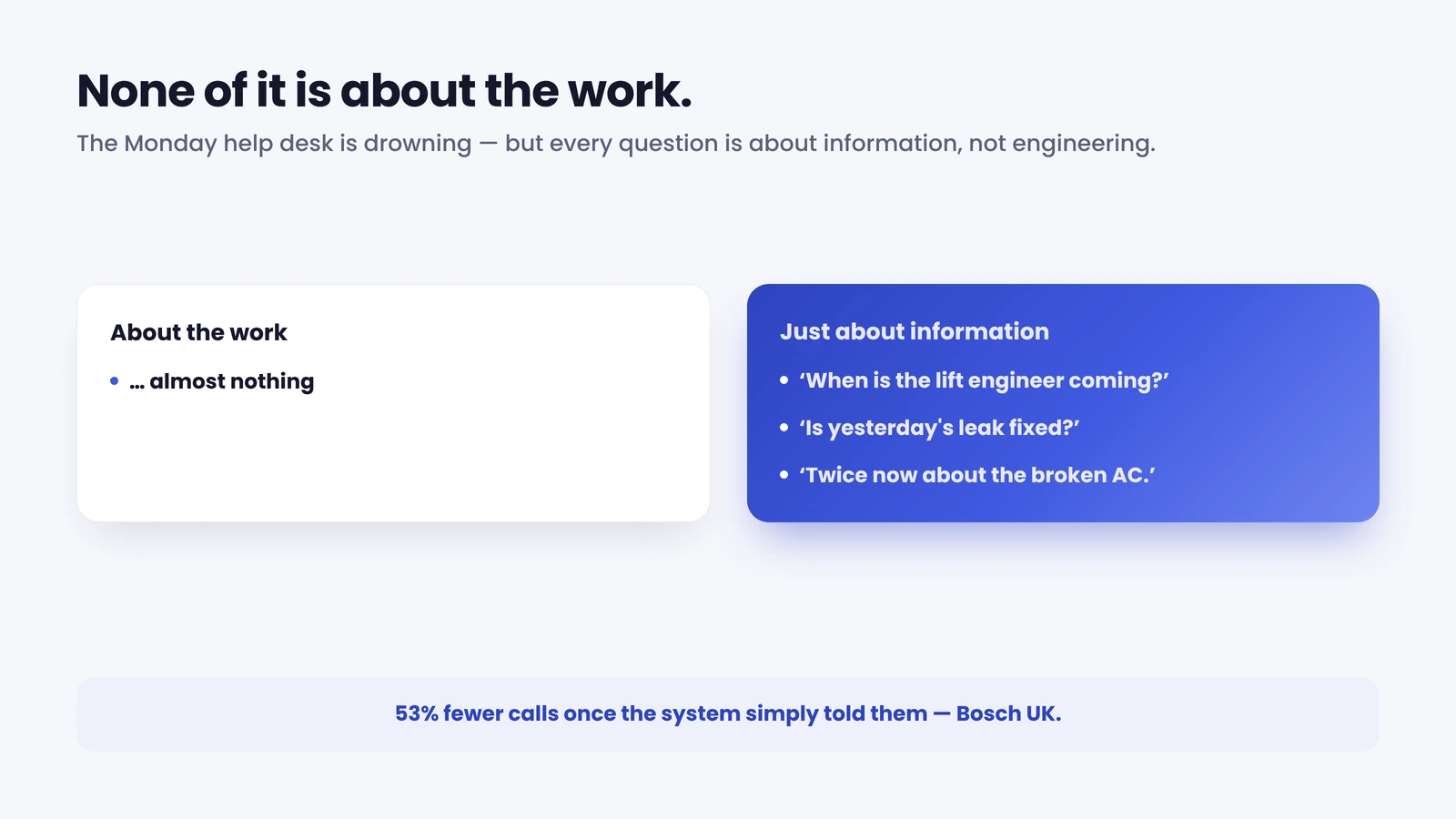
Picture the help desk on a Monday morning. A tenant has emailed twice about a broken air-conditioning unit, a site manager wants to know when the lift engineer is arriving, and three people have rung to ask whether yesterday’s reported leak has been fixed. None of those questions is about the work itself. They are all about information — who is coming, when, and is it done. That gap is what the right software is meant to close, and it is where most facilities teams still leak time.
Quick answer: Facilities management software is a system that helps an organisation run its buildings — logging maintenance jobs, scheduling engineers, tracking assets, managing contractors and reporting on costs. It coordinates the people and tasks that keep an estate safe, compliant and working. The strongest setups add one more thing: keeping occupants informed.
What is facilities management software?
Facilities management software is the system of record for the buildings an organisation occupies or manages. It captures maintenance requests, turns them into jobs, schedules the engineers or contractors who do the work, tracks the assets being serviced, and reports on cost, compliance and performance across the estate.
For an enterprise FM team (a Facilities Director with multi-site responsibility, or a Head of FM running in-house and outsourced engineers side by side), the software is the difference between a coordinated operation and a flood of emails and spreadsheets. It holds the planned maintenance calendar, the reactive job queue, the asset register and the contractor records in one place, so that nothing falls through the gap between a fault being reported and an engineer turning up.
The category is broad on purpose. “Facilities software” covers everything from a single-building maintenance log to an estate-wide platform handling thousands of assets, hundreds of engineers and a web of suppliers. The market reflects that breadth and the money moving into it: the wider field service management market, which underpins most FM job execution, is forecast to grow from $5.10 billion in 2025 to $9.17 billion by 2030, a compound annual growth rate of 12.5% (MarketsandMarkets, 2025). The question for a buyer is rarely whether to use FM software, but which type, and what it leaves out.
Core features of FM software
Good facilities management software earns its place by doing a handful of jobs well. The features below are the ones an enterprise FM team should expect as standard.
- Work order management. Capturing a request, raising a job, assigning it, tracking it through to completion and recording what was done. This is the operational heartbeat; our guide to work order management covers the create-to-close lifecycle in detail.
- Planned and reactive maintenance. A calendar of scheduled servicing that runs alongside the reactive queue, so routine upkeep does not get crowded out by emergencies. See planned preventive maintenance for how the planned side reduces breakdowns.
- Asset and equipment registers. A live record of what is in each building (plant, lifts, HVAC, fire systems) with service history, warranties and lifecycle data attached.
- Engineer and contractor scheduling. Matching the right person to the right job by skill, location and availability, whether that person is on your payroll or a supplier’s.
- Compliance and certification tracking. Evidence that statutory inspections, safety checks and certifications are current — the records you need when an auditor asks.
- Reporting and analytics. Cost per building, first-time fix rate, response times and backlog, turned into something a Facilities Director can take to the board.
- Occupant and customer communication. Keeping the people in the building informed about jobs that affect them. This is the feature most platforms treat as an afterthought, and the one we return to below.
A system that does the first six competently will run your operation. A system that also does the seventh will change how the building feels to the people inside it.

FM software vs CAFM vs CMMS
The terms overlap, vendors blur them, and buyers end up comparing tools that do different jobs. Here is the short version, with one rule of thumb: the narrower the term, the more it focuses on maintenance and assets; the broader the term, the more it spans the whole estate.
- CMMS (computerised maintenance management system). The narrowest. Built around maintenance and assets: work orders, preventive schedules, spare parts, equipment history. Strong for plant-heavy operations where keeping kit running is the whole job.
- CAFM (computer-aided facilities management). Broader. Adds space and people to the picture — floor plans, room bookings, occupancy and moves alongside the maintenance and asset functions. A computer-aided layer over how a building is used as well as maintained. We go deeper in our guide to CAFM systems.
- FM software / facilities management system. The umbrella term. Covers the full estate (maintenance, assets, space, contractors, compliance, energy and cost), whether delivered as one platform or several connected tools. CAFM and CMMS are subtypes that sit under it.
In practice many enterprise teams run a CAFM or CMMS at the core and bolt on whatever it lacks. The trap is assuming any of the three covers occupant communication well. They rarely do, because all three were designed to coordinate the operation (the help desk, the engineer, the asset) rather than the person standing in the building waiting for the work to happen.
Field service within FM
Facilities management is, at the sharp end, a field service operation. The plant does not fix itself; an engineer travels to a site, diagnoses a fault and resolves it — ideally on the first visit. That makes the metrics of field service management directly relevant to any FM team running engineers across an estate.
The headline number is first-time fix rate: the share of jobs resolved in a single visit. The industry average sits at 76%, with top performers reaching 87% and the bottom quartile down at 55% (Aquant Field Service Benchmark, 2024). For a multi-site estate, the gap between 55% and 87% is enormous — every failed first visit means a second journey, a longer outage and an occupant who has watched an engineer come and go without fixing the problem. Getting the right information, parts and skills to the engineer before arrival is how that number moves, and it is one of the clearest returns FM software can deliver.
Whether your engineers are in-house or supplied by a contractor, the field service discipline is the same: capture the job cleanly, schedule it intelligently, equip the engineer to fix it once, and close it with a record you can trust. FM software that treats job execution as a first-class function, rather than a list of open tickets, is what lifts the fix rate across a portfolio of buildings.
Communicating with occupants and customers
Here is the gap that most facilities management software leaves open. None of the systems above is built to keep the occupant informed, and the occupant is the person generating most of the inbound noise.
The pattern will be familiar to anyone who runs an estate. Between 30 and 40% of appointments are changed by the customer or occupant, and a further 10 to 15% are cancelled. Each of those changes tends to mean a five-to-seven-minute call, usually placed after hours when no one is at the desk to take it (On My Way internal research). Add the people who simply ring to ask “when is the engineer coming?” or “is it fixed yet?”, and a large slice of an FM help desk’s workload turns out to be questions the system already knows the answer to. This is the appointment problem, and it is the same in a hospital trust, a retail portfolio or a corporate campus: the events that drive the work are exactly the events the occupant most wants to hear about, and the system keeps them to itself.
53% — Bosch UK cut ETA-related calls to the contact centre by 53% after adding a self-service tracking and rebooking layer for the people waiting on their engineers.
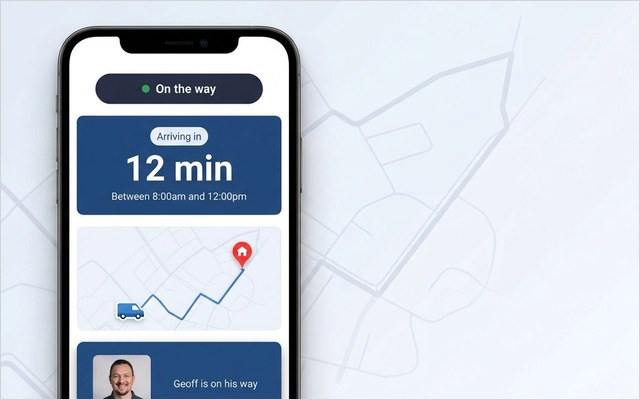
The fix is not to replace your FM platform. It is to surface the status changes it already records. When a job is booked, the occupant gets a confirmation. Before the visit, a reminder. On the day, a live link to track the engineer’s arrival. If the slot no longer works, the occupant rebooks themselves rather than ringing the desk. When the job is done, a “your repair is complete” message and a one-tap request for feedback. On My Way is built to do exactly this — a browser-based portal with no app to install, real-time engineer tracking, self-service rebooking and automated SMS and email, sitting on top of whatever FM or field service system you already run. The principle is simple: keep your FM platform, add the occupant communication layer. You can see how the engine works on the how it works page, and the automated notifications feature in detail.
This is not only a help-desk efficiency story. It is a first-visit one. E.ON, which got the right information to its engineers ahead of each appointment, improved appointment-based first-time job completion by 19%, the kind of result that comes from preparing the visit properly rather than discovering the gap on the doorstep. For more on the discipline, see customer communication management software.
How to choose facilities management software
Choosing well is mostly about matching the tool to the estate, then checking what it leaves out. A few questions cut through the vendor noise.

Start with the shape of your estate. A plant-heavy single site with a clear maintenance burden may be well served by a CMMS. A multi-building portfolio where space, occupancy and moves matter as much as maintenance points towards CAFM or a broader facilities management system. Size the tool to the problem, not to the longest feature list.
Check it handles both in-house and contracted labour. Enterprise FM almost always runs a mix. Software that assumes every engineer is on your payroll will fall over the moment a contractor is involved.
Insist on field service depth, not just ticketing. A queue of open jobs is not the same as a system that schedules intelligently, equips the engineer and drives first-time fix. Ask how the tool affects the fix rate, not how many tickets it can hold.
Demand real reporting. A Facilities Director needs cost per building, response times and backlog in a form that survives a board meeting. If the analytics are an afterthought, so is the platform.
Then ask the question vendors skip: how does it talk to the occupant? Most FM software has no answer beyond an email confirmation. That is the gap to plan for from the start — either the platform handles occupant communication properly, or you add a dedicated layer that does, on top of the system you choose.
The reassuring part is that the communication layer is additive. You do not have to compromise your choice of FM platform to get it. Pick the operational system that fits your estate, then add the occupant-facing layer separately if the platform falls short, which, on this dimension, most do.
Getting started
Facilities management software rewards sequence. Get the operational core right first (work orders, planned maintenance, the asset register, scheduling), because everything else depends on a clean, current record of what needs doing and who is doing it. Standardise how jobs are captured and closed so the data going in and the reports coming out can be trusted. Then close the loop with the occupant, turning the status changes your system already produces into proactive updates and self-service.
For an enterprise FM team, that last step is the one occupants actually notice, and the one that takes the most volume off the help desk. Because the communication layer sits on top of your existing FM platform rather than replacing it, it typically goes live in four to six weeks — no rip-and-replace, no disruption to the system your engineers already use. The quickest way to see it against your own operation is to book a demo.
Frequently asked questions
What is facilities management software?
Facilities management software is a system that helps an organisation run its buildings — logging maintenance requests, scheduling engineers and contractors, tracking assets and equipment, managing compliance and reporting on cost and performance across an estate. It is the operational system of record for everything that keeps buildings safe, compliant and working, and the broad category that CAFM and CMMS sit within.
What is the difference between FM software and CAFM?
FM software is the umbrella term for systems that run the whole estate — maintenance, assets, space, contractors, compliance and cost. CAFM (computer-aided facilities management) is a subtype within it that focuses on space, people and assets alongside maintenance, adding floor plans, room bookings and occupancy to the picture. In short, all CAFM is FM software, but FM software spans more than CAFM. Our CAFM guide covers the subtype in depth.
What is the difference between CAFM and CMMS?
A CMMS (computerised maintenance management system) is built around maintenance and assets — work orders, preventive schedules and equipment history. CAFM is broader, adding space and occupancy management on top of those maintenance functions. A plant-heavy operation may only need a CMMS; a portfolio where how buildings are used matters as much as how they are maintained points towards CAFM.
Does facilities management software help with field service?
Yes — FM is a field service operation at the sharp end, with engineers travelling to sites to fix faults. Good FM software schedules those visits intelligently, equips the engineer and drives first-time fix rate, which averages 76% across the industry and reaches 87% among top performers (Aquant, 2024). For a multi-site estate, lifting that rate is one of the clearest returns the software delivers.
Can I add occupant communication without replacing my FM platform?
Yes. A dedicated communication layer reads the status changes your existing FM or field service system already records — booked, scheduled, en route, complete — and turns them into automatic confirmations, reminders, live engineer tracking, self-service rebooking and feedback requests. It sits on top of your current platform rather than replacing it, which is how it can go live in four to six weeks.
The bottom line
Facilities management software keeps an estate running, but most systems stop at the operation — the help desk, the engineer, the asset — and leave the occupant in the dark. The result is a help desk fielding calls the system could answer automatically. Choose the operational platform that fits your estate, then add the occupant-communication layer that turns its own status updates into proactive messages and self-service. That is the step that takes volume off the phones and the one occupants notice.
References
- MarketsandMarkets — Field Service Management Market (2024). FSM market USD 5.10B (2025) forecast to USD 9.17B (2030), 12.5% CAGR
- Aquant — Field Service Benchmark Report (2024). Average first-time fix rate 76%; top performers 87%, bottom quartile 55%
- On My Way / Leadent Digital — internal deployment research (appointment-change and cancellation volume; client outcomes).

Keep your WFM. Upgrade what your customers experience.
On My Way is the customer-experience layer for field service: live arrival tracking, self-service rebooking, notes and photos, and feedback — added on top of the scheduling system you already run. No rip-and-replace, live in 4–6 weeks.