Job Scheduling Software for Field Service: The Half Most Tools Ignore

Field service buying has a reliable reflex: when appointments keep going wrong, blame the scheduling engine and shop for a new one. It is usually the wrong diagnosis. In most enterprise operations the problem sits somewhere the optimiser cannot see: the customer’s side of the schedule.
Quick answer: Job scheduling software (in field service, often searched as field service scheduling software) assigns, sequences and re-optimises field service jobs against skills, parts and SLA constraints. If you run an enterprise WFM platform, that engine is rarely your problem. The buying gap is customer-side scheduling: chosen slots, instant confirmation, self-service rebooking. Closing it is guaranteed work: On My Way commits to 35% fewer appointment-related calls within 90 days.
Key takeaways
- Job scheduling software works at job level: assignment, sequencing, constraint handling and in-day re-optimisation. Workforce scheduling, which plans capacity weeks ahead, is a separate discipline.
- Enterprise WFM platforms already optimise well; most visible scheduling failures happen after the plan is set, on the customer’s side.
- At 200 technicians and above, require deep constraint handling, real-time re-flow during the day, and API access that can power customer communication.
- A schedule change the customer makes online costs the operation nothing; the same change made by phone costs an agent call. At enterprise volume, that arithmetic sets your cost to serve.
- No-shows are the cleanest scheduling-quality metric, and the biggest reductions come from the customer side, not from swapping the optimiser.
What job scheduling software does at job level
Job scheduling software decides which technician attends which job, in what order, under which constraints, and it revises that plan as the day moves. Four functions sit underneath every serious product. Assignment matches each job to an engineer with the right skills, certifications and van stock. Sequencing orders each engineer’s day to cut travel and protect promised windows. Constraint handling keeps the plan feasible: SLA clocks, site access hours, two-person jobs, parts availability. Re-optimisation reworks the schedule in-day when an engineer calls in sick, a job overruns or an emergency lands at the top of the queue.
Vendors package those four functions under many labels: engineer scheduling software, a job scheduling app for technicians, scheduling software for field teams. The mechanics are the same, and they sit at the centre of the wider field service management stack. It is a crowded market to buy in. MarketsandMarkets values field service management software at USD 5.10 billion in 2025, rising to USD 9.17 billion by 2030, and scheduling is the module every vendor leads with.
Two neighbouring terms deserve separating before any shortlist. Workforce scheduling is the planning discipline that sets capacity weeks and months ahead: shift patterns, territories, contractor mix. Dispatch management software is the execution layer that gets today’s plan delivered hour by hour. This article stays at job level: the software that picks, orders and re-orders individual visits.
The engine is rarely the problem
If your operation already runs Oracle Field Service, IFS, SAP, ServiceMax, Salesforce Field Service or Microsoft Dynamics 365, the optimisation engine is almost never what is failing your customers. Those platforms carry two decades of investment in routing algorithms and constraint solvers, and they schedule thousands of jobs across hundreds of engineers better than any planner ever could. Replacing one because customers keep complaining is expensive surgery on the wrong organ.
Trace the complaints instead and a pattern appears. The visit that died because nobody confirmed the customer would be in. The slot that moved inside the engine but was never communicated outside it. The customer who wanted to switch Thursday to Friday, met a call queue, gave up and stayed silent. None of these is an optimisation failure. Each one happened after the optimiser had done its job.
On My Way’s deployment research shows how much an enterprise schedule moves after booking: roughly one appointment in three is amended at least once before the technician arrives. Where the phone is the only channel for those changes, each one either occupies an agent or, worse, never happens, and the first the operation hears of it is a technician outside an empty house.
What to require at enterprise scale
At 200 technicians and above, four requirements separate enterprise-grade job scheduling software from a small-business diary tool.
- Constraint depth. Skills, certifications, parts on the van, SLA clocks, access windows, multi-visit and two-person jobs. Shallow constraint models produce schedules that look full and fail on arrival.
- Real-time re-flow. Overnight batch optimisation was acceptable in 2010. An enterprise day needs continuous re-optimisation as jobs overrun, cancel and arrive.
- API access. Schedule data must flow out to power customer communication, and customer decisions must flow back in. A closed scheduler caps everything you build on top of it.
- Security and governance. Single sign-on through Microsoft Entra ID, role-based access control, encryption, data residency options and GDPR compliance. IT will ask; have the answers ready.
Constraint depth is where the money hides. Aquant’s 2024 benchmark puts the average first-time fix rate at 76%, with the best organisations reaching 87% while the bottom tier sits at 55%. The distance between those bands is mostly scheduling: the right engineer, with the right part, at the right address. No amount of technician heroics recovers a job the schedule set up to fail.
Every schedule has two customers
A field service schedule serves two audiences at once: the operation that builds it and the person at home who plans a day around it. Almost all job scheduling software is designed, demonstrated and bought as if only the first existed. The operation gets Gantt boards, utilisation dashboards and exception views. The customer gets a letter, or a text announcing a five-hour window, take it or leave it.
That imbalance now costs money, because customers judge the whole organisation on it. In Salesforce’s 2024 research, 80% of customers say the experience a company provides matters as much as its products or services. For a boiler repair or a broadband installation, the experience largely is the schedule: which slots were offered, whether the booking confirmed instantly, whether the ETA was honest, and how hard it was to move the visit.
Evaluate scheduling software twice, then. Once from the control room: constraints, re-flow, utilisation. Once from the kitchen table: can the customer see the appointment, trust it and change it without calling? Most shortlists never run the second evaluation.
See the second half working: the how it works walkthrough follows the customer journey end to end, from slot choice to same-day tracking, running on top of an unchanged WFM. It is the quickest way to check whether the gap exists in your operation.

The half most tools ignore: the customer’s side of the schedule
Customer-side scheduling means the customer can see, choose and change their appointment without ringing anyone. In practice it adds five capabilities on top of the engine you already own.
Slot choice comes first. Instead of imposing a window, the operation presents appointment scheduling options the WFM engine has already judged feasible, and the customer picks one in the browser, with nothing to install. The engine still controls what is offered, so optimisation is protected. What changes is commitment: a chosen slot is one the customer defends in their own diary. Instant confirmation follows by SMS and email (On My Way sends through Twilio, Boomerang or Leadent’s own SMS Gateway), so the booking lives in the customer’s pocket, not just your database.
Self-service rebooking is the economic core. A change made by the customer online costs the operation nothing; the same change made by phone consumes an agent call and often a follow-up. Set that against a base where one booking in three moves, and self-service becomes the difference between a contact centre that scales with appointment volume and one that drowns in it. Cancellation belongs in the same channel: a visit cancelled online the night before is capacity the optimiser can re-spend; one discovered on the doorstep is written off.
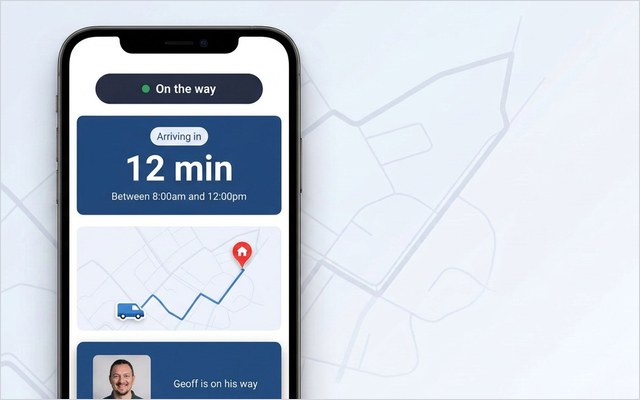
Two further capabilities round out the customer half. Green slots turn route efficiency into a customer choice: the booking screen flags appointments aligned with a technician already due nearby, and every eco slot accepted is a shorter route the optimiser did not have to fight for. On the day itself, live technician tracking with a real ETA replaces the anxious morning of wondering, and real-time NPS and CSAT capture lands while the visit is still fresh. Agents see the same picture through Contact Centre View on the Premium tier, so when a call does happen it starts from shared facts.
No-shows are a scheduling-quality metric
The sharpest test of scheduling quality is how often the customer is absent when the technician arrives. A no-show means the plan was built, optimised and dispatched, and still produced nothing: a wasted drive, a lost slot, a rebooked job carrying double cost. Engines do not fix no-shows, because no-shows are not an optimisation failure. They are a communication failure wearing an operations costume.
Foxtel, the Australian subscription television operator, recorded 38% fewer customer no-shows after putting On My Way’s customer-side layer over its existing field service scheduling. The mechanism is unglamorous. Customers who choose their slot, receive confirmation at once, are reminded as the visit approaches and can rebook online at 9pm rather than abandoning a daytime call queue turn out, predictably, to be at home more often.
Treat no-show rate, kept-appointment rate and inbound “where is my engineer?” call volume as first-class scheduling metrics, alongside utilisation and travel time. They measure the half of the schedule your customers live in.

Buying it: integration, pilot and price
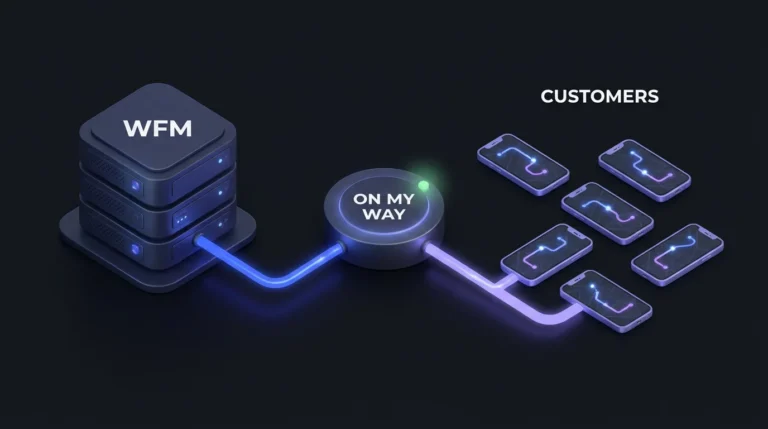
Fixing the customer side of scheduling does not require a replacement programme. On My Way deploys as a layer over Oracle Field Service, IFS, SAP, ServiceMax, Salesforce Field Service and Microsoft Dynamics 365, reading the schedule and writing customer decisions back through APIs. The WFM keeps doing the optimisation it is good at; the layer supplies the half it never had. Typical go-live is four to six weeks, and a six-week pilot is available where you want evidence from your own job mix first.
The commercial risk sits with the vendor, where it belongs. On My Way guarantees a 35% reduction in appointment-related inbound calls within 90 days of go-live, and keeps working at no charge until that number is met; mature deployments typically settle higher, between 40 and 55%. Pricing follows the estate rather than the project: a per-technician recurring fee, or an appointment-volume model for the largest operations, quoted against your numbers. The whole customer experience runs white-label, under your brand, in the customer’s browser.
For a UK-focused shortlist of platforms and what to require from them, see the field service management software UK guide.
Related reading: how to choose workforce scheduling software, route optimisation for field service teams and workforce management software for field service.
Frequently asked questions
What is the difference between job scheduling software and workforce scheduling software?
Job scheduling software decides today’s and this week’s visits: which engineer, in which order, with live re-optimisation. Workforce scheduling plans the capacity behind it, weeks to months ahead: shift patterns, territories, hiring and contractor mix. Enterprises need both; they are bought and measured separately.
Do we need to replace our WFM to fix scheduling problems?
Rarely. If complaints centre on confirmation, communication and rebooking rather than route quality, the engine is doing its job and the customer-side layer is missing. Adding that layer over an existing WFM typically takes four to six weeks, against a year or more for an engine replacement.
Will customer-chosen slots damage schedule efficiency?
No, because the choice is bounded. The engine calculates which windows are feasible and affordable to serve, and only those are offered. Green slots go further and steer customers toward appointments that shorten routes. The optimiser gives up nothing; the customer gains ownership of a slot they then tend to keep.
Is there a job scheduling app customers have to download?
No. On My Way’s customer side runs entirely in the browser, opened from an SMS or email link. That matters for adoption: a link works for every customer, on any phone, first time.
What should IT check before deployment?
Single sign-on via Microsoft Entra ID, role-based access control, encryption, data residency and GDPR compliance are standard. Integration runs through APIs against the existing WFM, so the scheduling engine itself is untouched.
How is On My Way priced?
Per technician on a recurring fee, or on appointment volume for the largest estates. There is no public rate card; quotes are built against your technician count and appointment mix, and the 35% call-reduction guarantee is written into the commercial terms.
The bottom line
Job scheduling software earns its keep at job level: assignment, sequencing, constraints, in-day re-flow. Your WFM almost certainly does that well already. What it almost certainly does not do is let the person at home choose, confirm and change the appointment without a phone call, and that is where the avoidable calls, the complaints and the no-shows live. Buy for both customers of the schedule, starting with the half you are missing.
If that half is your gap, ask for two things: a quote against your technician count, and a demo. The demo is a 30-minute working session on your own appointment journey, no slide deck. Bring your no-show rate.
References
- MarketsandMarkets — Field Service Management Market Forecast (2025)
- Aquant — Field Service Benchmark Report (2024)
- Salesforce — Customer Service Statistics (2024)
- On My Way / Leadent Digital — enterprise deployment data (appointment-change volume; client outcomes).

Keep your WFM. Upgrade what your customers experience.
On My Way is the customer-experience layer for field service: live arrival tracking, self-service rebooking, notes and photos, and feedback, added on top of the scheduling system you already run. No rip-and-replace, live in four to six weeks.