Field Service Management Software: The Definitive Guide

Field service management software is a USD 5.10 billion market in 2025, and MarketsandMarkets expects it to reach USD 9.17 billion by 2030, growing at 12.5% a year. Growth like that crowds the shelf with products sharing a label but not a job: trade apps for a two-van plumbing firm, suites scheduling national workforces, layers extending them. The market calls the whole shelf field service management software, FSM software or simply field service software. The names are interchangeable and this guide treats them that way, covering the category end to end.
Quick answer: Field service management software plans, dispatches, tracks and documents work done at customer sites. The category spans enterprise workforce-management suites, mid-market platforms and specialist layers that extend them. MarketsandMarkets values the market at USD 5.10 billion in 2025, heading for USD 9.17 billion by 2030. There is no universal best; fit depends on what you already run.
Key takeaways
- “Field service management software” and “field service software” name the same category; MarketsandMarkets forecasts growth from USD 5.10 billion in 2025 to USD 9.17 billion by 2030.
- The market splits into three tiers: enterprise WFM suites (Oracle, IFS, SAP, Salesforce, Microsoft, ServiceMax), mid-market platforms, and specialist layers that extend them.
- There is no universal best. Fit depends on workforce size, the systems you already run and the problem you need solved.
- Replacing a working scheduling engine takes quarters. Extending it with a focused layer takes weeks and carries far less operational risk.
- Every tier leaves the customer side of the appointment thin. Closing that gap cut technician-location and ETA-related calls by 53% at Bosch UK.
What is field service management software?
Field service management software is the category of systems that plan, dispatch, track and document work performed at customer sites: installations, repairs, planned maintenance and inspections. The same category trades under several names: vendors sell field service software, FSM software, a field service management system or an FSM platform, and analysts use the terms interchangeably. Treat the labels as one shelf and judge products on tier and fit.
Adoption shows how mature the shelf is. Gartner Digital Markets puts FSM software adoption above 76% among enterprise field service organisations, against roughly 29% for small businesses. At the top of the market the question is rarely whether to buy, but whether what you already own still earns its keep.
One page cannot own every angle, so this site splits the subject deliberately. Our pillar on field service management covers the discipline itself: the processes, metrics and operating model behind the software. The workforce management system overview covers the scheduling platforms at the core of most enterprise stacks. And the field service management software UK buyer’s guide narrows the shortlist for UK operations. This page is the category guide: what the software does, who sells it, how to choose.
The core modules of a field service management system
Seven modules recur in every serious product, whatever the tier. The weighting differs; the list barely does.
- Scheduling and optimisation. Builds the daily plan: which technician, which job, what order. At enterprise scale this is the hardest engineering in the category and the reason the big suites exist.
- Dispatch and routing. Turns the plan into the day on the road: assignments, live status and traffic-aware travel times.
- Work order management. The record of the job: scope, history, forms, sign-off, compliance evidence. Our guide to work order management software covers it in depth.
- The technician mobile app. The tool your field workforce actually touches: job details, safety checklists, photos, parts, proof of completion. The field service app guide sets out what a good one looks like.
- Parts and inventory. Van stock, warehouse links, returns. Weak parts data quietly caps first-time fix however good the schedule is.
- Analytics and reporting. Utilisation, travel time, first-time fix, SLA compliance. Products report deeply on operations; far fewer report well on customer experience.
- Customer communication. Confirmations, reminders, arrival windows, live tracking, feedback. Consistently the thinnest module in the category, and the subject of a later section.
Buyers score the first six hard because operations feel them daily; customers only ever meet the seventh. That asymmetry shaped how the market evolved.

The field service management software landscape: three tiers
The honest map of this market has three tiers, not a single ranking. MarketsandMarkets names the enterprise majors (Oracle, Microsoft, Salesforce, SAP, IFS and ServiceMax among them) in its 2025 forecast; beneath them sit hundreds of mid-market and specialist products.
| Tier | Typical products | Built for | Watch for |
|---|---|---|---|
| Enterprise WFM suites | Oracle Field Service, IFS, SAP Field Service Management, Salesforce Field Service, Microsoft Dynamics 365 Field Service, ServiceMax | Hundreds to thousands of technicians; complex scheduling, compliance and asset requirements | Implementations measured in quarters; customer-facing modules are the shallowest part of the platform |
| Mid-market and trade platforms | Joblogic, BigChange, simPRO, Commusoft, ServiceTitan, Jobber | Tens of vans up to low hundreds; all-in-one job management, quoting and invoicing | Optimisation depth and integration surface thin out as workforces pass a few hundred |
| Specialist layers | Route optimisation engines, parts-planning tools, customer communication layers such as On My Way | Operations keeping their existing core and needing depth on one problem | Deliberately narrow scope; a layer extends a system of record rather than replacing it |
Tier one: enterprise WFM suites. The six major suites schedule large workforces against SLAs, skills, parts and travel. For an operation running hundreds or thousands of technicians, one of them usually belongs at the core of the stack; our workforce management system overview covers them platform by platform. Two caveats recur: implementations run to quarters, and customer-facing modules receive a fraction of the engineering the scheduling engines get.
Mid-market and trade platforms (tier two). Joblogic, BigChange, simPRO, Commusoft, ServiceTitan and Jobber bundle scheduling, quoting, invoicing and job management into one product; the UK market is especially well served, as our field service software UK guide sets out. For tens of vans they are excellent value. The strain shows past a few hundred technicians, when optimisation depth, integration needs and enterprise security requirements outgrow the platform.
Specialist layers (tier three). This tier exists because suites optimise for breadth at the price of depth. A layer assumes you already own a system of record and goes deeper on one job than a suite can afford to: route optimisation engines, parts planning, remote assistance, customer communication. On My Way sits in that last group, adding live tracking, self-service rebooking and two-way appointment messaging on top of any major WFM platform rather than competing with it.
How to evaluate field service management software
Evaluate on five axes, in this order: the problem, integration, total cost, implementation reality and security. Feature checklists reward the wrong things, because most products within a tier share the bulk of their feature list.
- Start from the problem, not the demo. The best field service management software is a question about your operation, not the market. Write the problem in numbers first: calls per appointment, no-access rate, first-time fix, utilisation. Aquant’s 2024 benchmark gives reference points, with average first-time fix at 76%, top performers at 87% and the bottom tier near 55%. Where you sit on that spread changes what you should buy.
- Integration beats features. The product will live inside an estate: WFM core, CRM, ERP, identity, telephony. Ask for named, in-production integrations rather than an API brochure. The same test applies to layers; see the integrations On My Way maintains with Oracle Field Service, IFS, SAP, Salesforce Field Service, Dynamics 365 and ServiceMax.
- Cost the whole thing. Licences are the visible line; implementation, integration build, data migration, training and internal change effort routinely rival them across the first years. Pricing models vary (per technician, per user, per appointment volume), so force every quote into a multi-year total-cost view before comparing.
- Test implementation claims against operators your size. Ask referees one question: how long from contract to every technician using it daily? The gap between the sales answer and the reference answer is the most predictive data point in the process.
- Treat security as a gate, not a criterion. Single sign-on via Microsoft Entra ID or equivalent, role-based access control, encryption in transit and at rest, regional data residency, GDPR processing terms. Anything customer-facing handles personal data at volume; a vendor that cannot evidence these belongs off the shortlist.
Shortlisting for the customer-experience gap rather than the scheduling engine? See how On My Way runs on top of your existing WFM, or request a quote and a walkthrough against your own appointment volumes.
Implementation and change management: why replacements take quarters
Replacing an FSM platform is an operational transplant, not a software install. The schedule touches every technician, every dispatcher and every customer promise, so the project inherits the full weight of the operation around it.
Four workstreams set the timeline. Data migration: years of job history, assets and customer records that must arrive clean. Scheduling-rule rebuild: the accumulated skills, regions, SLAs and shift patterns that took years to tune. Integration rework: every system wired into the old platform needs rewiring into the new one. And retraining: dispatchers and technicians relearning the tool they use more than any other. Run those in parallel with live operations and you see why credible enterprise timelines are quoted in quarters.
The workforce context makes it harder. TSIA’s State of Field Services 2025 names talent acquisition and retention as the pressure that intensified most, driven by an ageing workforce and shifting job expectations. Salesforce’s 2024 State of Service research, drawn from more than 5,500 service professionals, found 77% of agents and 74% of mobile workers reporting heavier workloads year on year. A stretched team absorbs retraining slowly. Sequencing change, one system and one measurable outcome at a time, is not caution for its own sake; it is how transformations survive contact with a live schedule.
Extend or replace: the lower-risk route
If the scheduling engine still does its job and the gap is elsewhere, extend it; replace only when the core itself has failed. That decision, made early and on evidence, saves more money than any licence negotiation.
The arithmetic favours extension more often than vendor roadmaps suggest. Most enterprise operators already own capable optimisation, which is what Gartner’s 76% adoption figure means in practice, and the commonest genuine gaps (customer communication, self-service, day-of-visit visibility) sit in exactly the modules the suites build last. A focused layer closes a gap of that shape in weeks. On My Way, as one example, goes live in four to six weeks on top of an existing WFM platform, and a six-week pilot lets you measure call deflection on real appointments before any longer commitment. How it works shows the architecture; nothing about the core schedule changes.
Replacement still has its place: an engine out of support, a workforce that has outgrown a tier-two product, a merger forcing consolidation. The test is whether the problem lives in the engine or at its edges. Buying a new engine to fix an edge problem is the most expensive mistake this category offers.
AI and where field service software is heading
AI is arriving in field service software as features inside products you already know, not as a new category to buy. The suites have run machine learning in scheduling and travel-time prediction for years; what has changed is the layer technicians and customers can see.
Four capabilities are real today. Predictive ETAs that update from live technician movement rather than static windows. Optimisation that reweights a whole region when one job overruns. Copilot tools that draft work-order notes and surface fix history for the technician on site. And photo-based triage that routes the right part and the right skill before the visit. Investment is following: Salesforce’s 2024 research found 79% of service organisations already investing in AI, with 83% of decision makers planning to increase it.
The buying advice is unglamorous. Buy AI where your operational data already lives, because a prediction model is only as good as the job history and appointment outcomes underneath it. That strengthens the case for extending a well-run stack, and it means an AI label on a vendor slide deserves the same reference checks as any other claim.
The customer-experience gap every tier leaves open
Whichever tier you buy from, the customer side of the appointment is the least developed part of the product, and it is where expectations are moving fastest. In Salesforce’s 2024 research, 86% of agents and 74% of mobile workers said customer expectations keep climbing, and 76% of service organisations expected higher case volumes ahead. The operational core has had decades of engineering; the person waiting at home has had a text message.
The cost of that gap lands on the contact centre. On My Way deployment research finds appointment-status questions (where is the engineer, is my slot still happening, can I move it) at roughly a third of inbound service-line volume for enterprise operations, each call occupying an agent while the answer sits unread in a scheduling system. Failed visits compound it: Aquant’s 2024 benchmark found a failed first visit turns into 2.7 visits on average and adds 13 days to resolution. Many of those failures begin as communication failures; the customer who never saw the reminder was never going to be home.
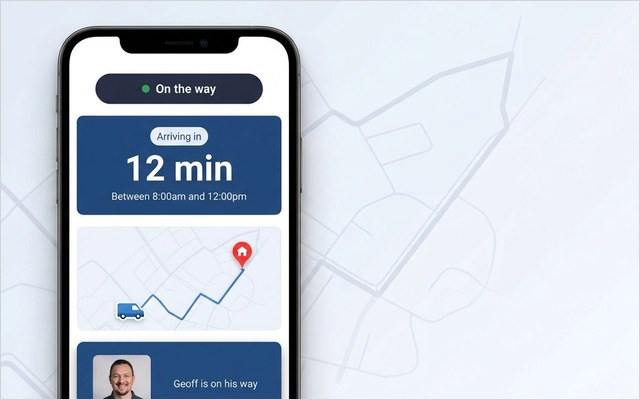
This is the gap the customer communication layer exists to close, and why the specialist tier belongs in an FSM software evaluation. On My Way gives the customer a browser-based view, with no app to install: live technician tracking with an accurate ETA, self-service booking, rebooking and cancellation, and two-way messages over SMS and email through Twilio, Boomerang or the Leadent SMS Gateway. Feedback arrives as real-time NPS and CSAT rather than a survey weeks later, greener appointment slots can be offered at booking, and the in-appointment moment carries white-labelled marketing your brand controls. Agents get the same live picture through Contact Centre View on the Premium tier, without consuming WFM licences. Security matches the checklist above: Microsoft Entra ID single sign-on, role-based access control, encryption, regional data residency, GDPR compliance.
The proof is specific. Bosch UK, running around 350 engineers and roughly 1,100 appointments a day, recorded 53% fewer technician-location and ETA-related calls and 79% higher customer engagement with appointment communications after deploying On My Way on top of its existing WFM. Three numbers matter here, and they are not the same number: Bosch UK’s 53% is one measured client outcome; typical deployments land 40–55% fewer appointment-related calls; and the commercial guarantee is deliberately more conservative, at 35% fewer appointment-related calls within 90 days, or Leadent stays on the job unpaid until the number is met.
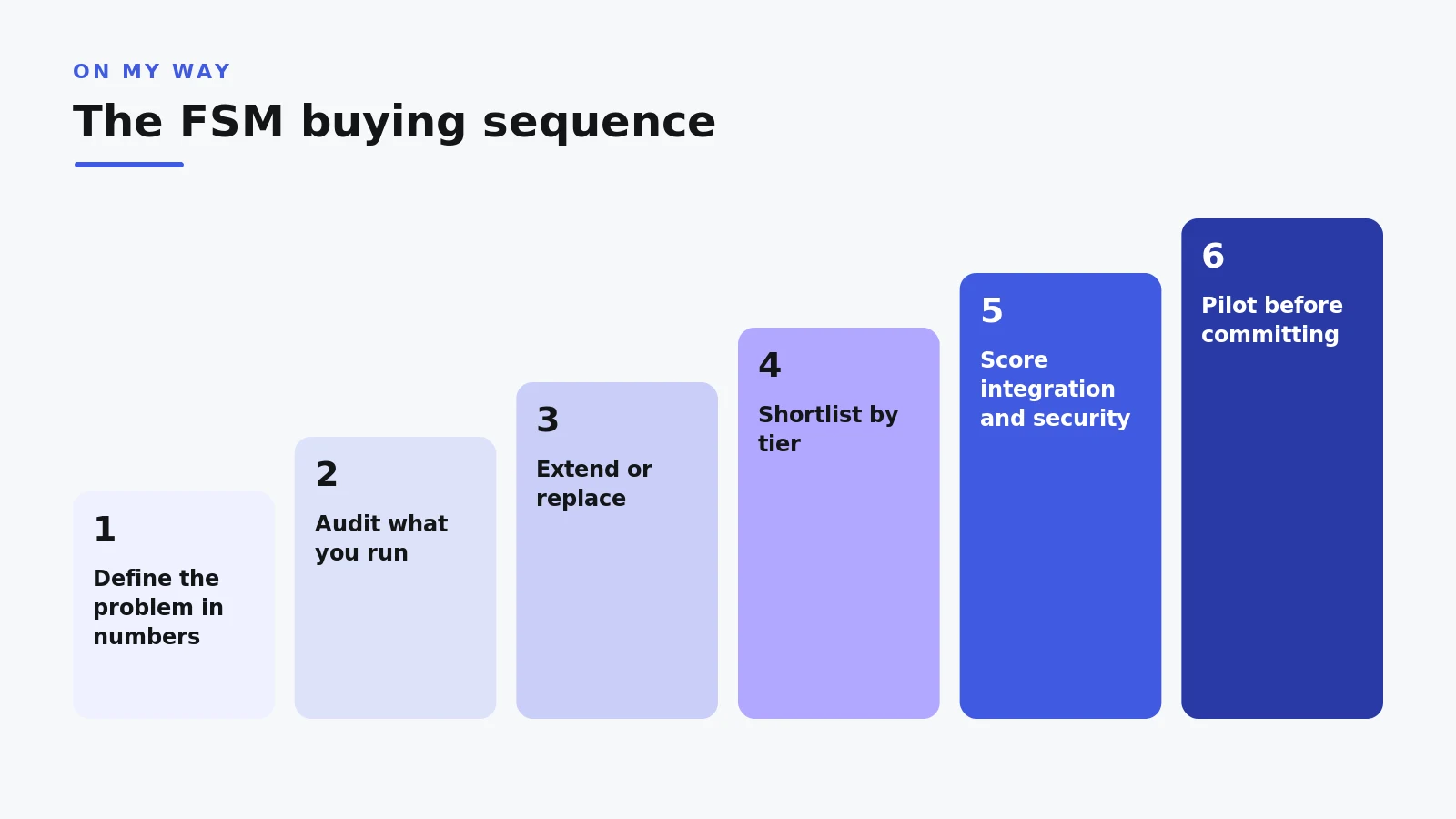
The buying sequence
Run the decision in this order and the market gets small quickly.
- Write the problem in operational numbers before any vendor call: calls per appointment, no-access rate, first-time fix, utilisation, complaint themes.
- Audit what you already run. Most enterprises own more capability than they use; the fix may be configuration, not procurement.
- Decide extend versus replace on the evidence from steps 1 and 2; hold that line when roadmap slides argue otherwise.
- Shortlist by tier, not by aggregate review score. A brilliant trade platform is still the wrong answer for 800 technicians.
- Score integration and security before features, with named in-production references for both.
- Check implementation timelines with operators your size, off the vendor’s reference list if you can.
- Pilot before committing. Six weeks of real appointments beats any scoring matrix; if the gap is customer-facing, request a quote and a pilot plan.
Frequently asked questions
What is the best field service management software?
There is no universal best, and rankings that claim one are selling something. Enterprise operations with complex scheduling usually need a tier-one WFM suite at the core; growing trade businesses are better served by mid-market platforms; operations with a sound core and one stubborn gap get more from a specialist layer. Define the problem in numbers, then pick the tier that solves it.
What is the difference between field service software and field service management software?
Nothing: they are two names for the same category, used interchangeably by vendors, analysts and buyers. FSM software, field service management system and FSM platform are the same shelf again. Compare products on tier, integration and evidence rather than on what the label says.
Is field service management software the same as a workforce management system?
They overlap heavily. A workforce management system is the scheduling and optimisation engine; field service management software is the broader category that includes it alongside work orders, mobile tools, parts and customer communication. In enterprise practice the WFM platform is usually the core, with other capabilities built in or layered on top.
How much does field service management software cost?
Most vendors price per technician or per user per month, some offer appointment-volume models for large fleets, and almost all enterprise pricing is quoted to scope. Budget beyond the licence: implementation, integration and change effort are substantial in year one. Insist on a multi-year total-cost comparison rather than a licence-price one.
How long does implementation take?
Replacing a core FSM or WFM platform at enterprise scale realistically takes quarters once data migration, scheduling-rule rebuilds, integration rework and retraining are counted honestly. Specialist layers are faster because the core stays put: On My Way typically goes live in four to six weeks, with a six-week pilot available to prove the numbers first.
Do customers need to download an app to use a communication layer?
Not with On My Way: the customer side is browser-based, opened from an SMS or email link, with nothing to install. That matters for adoption, because every extra step cuts the share of customers who engage; at Bosch UK, customer engagement with appointment communications was 79% higher on this model.
Can field service software integrate with an existing WFM platform?
Yes, and for specialist layers that is the entire design brief. On My Way runs on top of Oracle Field Service, IFS, SAP, Salesforce Field Service, Microsoft Dynamics 365 Field Service and ServiceMax without changing how the core schedule works. Ask any layer vendor for named integrations in production, not connector brochures.
The bottom line
Field service management software is one category with three tiers, and the tiers answer different questions. Suites earn their place optimising large workforces; mid-market platforms run whole businesses for smaller fleets; specialist layers add the depth, above all on the customer side, that neither builds well. In a market growing at 12.5% a year, the discipline that pays is not chasing the newest platform. It is matching the tier to the problem, and refusing to replace what already works.
If the problem you wrote down is appointment calls, no-access visits or customers who cannot see their engineer coming, that is the gap On My Way closes on top of the WFM you already own. Request a quote, or start with how it works.
References
- MarketsandMarkets — Field Service Management Market Growth Forecast (2025)
- Aquant — Field Service Benchmark Report (2024)
- Salesforce — State of Service: Customer Service Statistics (2024)
- Gartner Digital Markets — Field Service and Maintenance Software Market Insights (2024)
- TSIA — The State of Field Services (2025)
- On My Way / Leadent Digital — enterprise deployment data (appointment-change volume; client outcomes).

Keep your WFM. Upgrade what your customers experience.
On My Way is the customer-experience layer for field service: live arrival tracking, self-service rebooking, notes and photos, and feedback — added on top of the scheduling system you already run. No rip-and-replace, live in 4–6 weeks.