Dispatch Management Software: The Complete Guide

The dispatch board is the busiest screen in a field service operation, and the one your customer never sees. It shows every engineer, job, route and gap in the day — the live picture coordinators lean on to keep promises. The customer at home, on a four-hour window, sees none of it. That gap between what the operation knows and what the customer knows is where most “where’s my engineer?” calls come from. This guide explains dispatch management software properly, then closes the loop the board itself can’t.
Quick answer: Dispatch management software assigns field jobs to the right technician, builds their schedule and route, and tracks each job in real time as it moves from booked to done. It is the operational engine that decides who goes where, when, and in what order: the digital version of the dispatch board.
Key takeaways
- Dispatch management software is the engine that assigns jobs, builds schedules and routes, and tracks work in real time: the digital dispatch board.
- Its core features are scheduling and dispatch, route optimisation, real-time job updates and a technician mobile app.
- Dispatching is one layer of the broader field service management stack, not the whole of it.
- A dispatch system can run flawlessly and still leave the customer in the dark, because nothing on the board reaches them.
- Pairing dispatch with a customer-communication layer turns clean dispatch into visible service and higher first-time fix.
What is dispatch management software?
Dispatch management software takes incoming field jobs and decides which technician handles each one, in what order, along what route, then tracks every job through the day. It is the modern form of the dispatch board: the single live view a coordinator uses to balance a fleet of engineers against a day’s work.
Strip it back and dispatching answers three questions, continuously: who is free, who is closest, and who has the right skills and parts. Good field service dispatch software answers those in real time and at scale, matching hundreds of jobs to hundreds of engineers, and adjusting when a job overruns or an engineer calls in sick. One point of scope, because “dispatch software” gets used loosely: dispatch coordinates the workforce. It is an internal, operational tool. That matters later.
The key features of dispatch management software
The features that earn their keep all serve one goal: getting the right engineer to the right job at the right time. Four do the heavy lifting:
- Scheduling and dispatch. The core. The system slots each job into a technician’s day and assigns it by skills, location, availability, windows and parts. Better tools optimise the whole schedule rather than filling diaries first-come-first-served, and re-optimise when reality intervenes. This is work order management in motion: the work order is the job; scheduling and dispatch is how it reaches an engineer.
- Route optimisation. Driving eats a large slice of every technician’s day. Route optimisation sequences each engineer’s jobs to cut mileage and drive time: more jobs completed, lower fuel cost, no one working longer.
- Real-time job updates. A static schedule is obsolete by mid-morning. The engineer marks a job en route, on site or complete from a mobile device, and the board reflects it instantly, so coordinators react to slippage as it happens, not at day’s end.
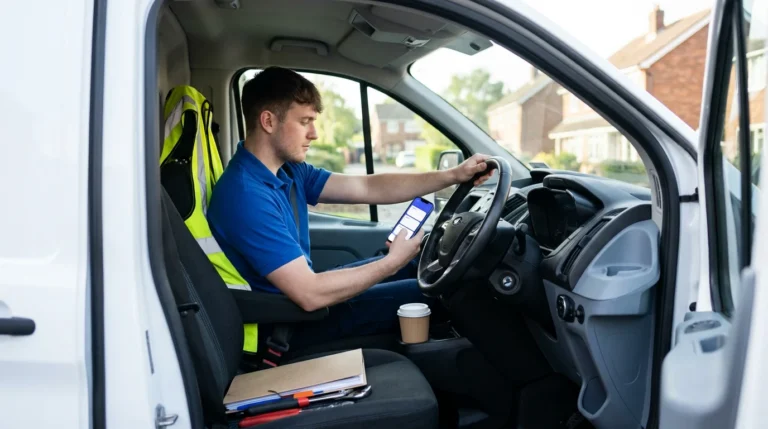
- The technician mobile app. Dispatching only works if it reaches the engineer. The app puts the day’s jobs, route, asset history and customer notes in the technician’s hand, and lets them update status, capture photos and close jobs on site. It is the channel between the board and the doorstep.

Dispatch versus the broader FSM stack
Dispatch management software is one layer of field service management, not the whole of it. Around it sits the rest of the machinery: work order management, asset and inventory management, field service automation, analytics, and the workforce-management (WFM) platform that ties it together — Oracle Field Service, IFS, SAP, ServiceMax, Salesforce Field Service, Dynamics 365. Large enterprises usually run dispatch inside one of those suites; smaller operations may use a standalone tool.
The market shows how central this stack has become: the field service management market is worth around USD 5.10 billion in 2025 and is forecast to reach USD 9.17 billion by 2030, a compound annual growth rate of 12.5% (MarketsandMarkets, 2025). Most of that investment goes into the engine room of scheduling, routing and mobile enablement, which is where dispatch lives. And here is the catch: every component above is built to coordinate the operation. Not one is built to be seen by the customer.
The missing piece: the customer can’t see the dispatch board
The dispatch board is the richest source of real-time appointment information in the business: it knows the engineer is assigned, knows the window, knows when they’re en route, knows when the job is done. The one person who most wants that information, the customer at home, has no window into it.
So they phone, to confirm the appointment, ask for a tighter time, ask where the engineer is, reschedule. Every one of those calls asks the contact centre to read out, by hand, a status the board already holds. This is the appointment problem, and it is bigger than most operations measure: across a typical enterprise field operation, a third to 40% of appointments get changed by the customer and another one in ten are cancelled, with each change generating a five-to-seven-minute call, usually after hours (On My Way internal research). Add everyone who simply rings to ask “what time?” and “where are they now?”, and a large share of contact-centre volume is questions a connected dispatch system could answer automatically. The information exists; it just stops at the edge of the board.
How dispatch and a customer portal work together
The fix is not a better board; it’s giving the customer their own view of the relevant slice of it. A customer-communication layer reads the same dispatch events the board already produces and turns them into proactive, self-service touchpoints.
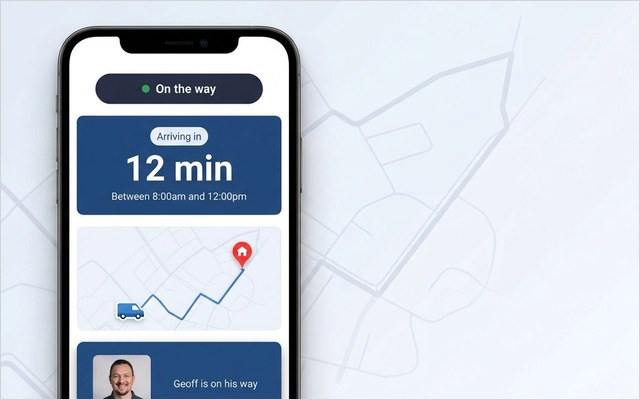
The mechanics are simple because the data is already there. When dispatch assigns and schedules the job, the customer gets an automatic confirmation with the window, and the ability to reschedule or cancel in a tap. When the engineer is marked en route, they get a live ETA and a track-my-engineer link, from the same status the coordinator sees. When the job is closed on the app, they get a completion message and a one-tap feedback request. The board stays exactly as it is; the layer simply surfaces the parts that concern the customer.
Two things make this practical at enterprise scale. The customer view is a browser-based portal, no app to install, so adoption isn’t a barrier. And you don’t replace your dispatch system to add it: the layer sits on top of whatever you already run — Oracle, IFS, SAP, ServiceMax, Salesforce or Dynamics — and reads its events. Be clear about what it is and isn’t, though: it is not a dispatch or scheduling engine, and it doesn’t assign jobs or build routes. It is the customer-facing surface on top of the engine you already trust. You can see the real-time technician tracking and automated notifications that deliver it.
53% — Bosch UK, a 350-engineer UK enterprise HVAC operation handling around 1,100 appointments a day, cut ETA-related calls by 53% with exactly this kind of self-service and live-tracking layer on top of its existing dispatch system.
Dispatch and first-time fix
Good dispatch and high first-time fix are tightly linked. The whole point of intelligent dispatching is to send an engineer who can finish the job — right skills, right parts, right information — which is exactly what moves the first-time fix rate, one of the most important efficiency metrics in field service.
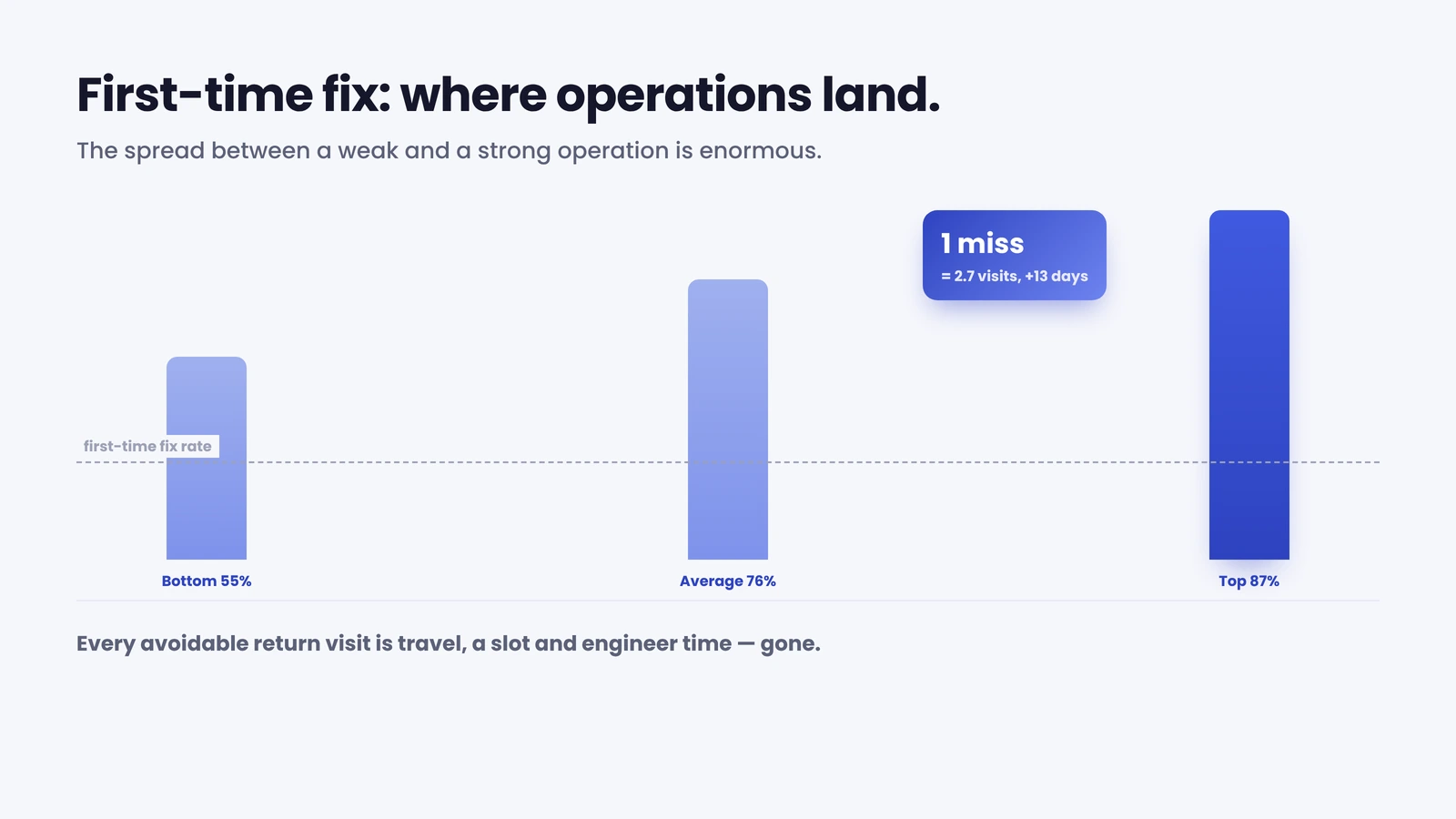
The stakes are high. The average first-time fix rate sits at 76%, with top performers at 87% and the bottom quintile at 55% (Aquant Field Service Benchmark, 2024). A miss is expensive: a failed first visit turns one job into 2.7 visits on average and adds about 13 days to resolution (Aquant, 2024), and every repeat is a second dispatch and a second route, capacity spent fixing a miss rather than clearing the backlog. Dispatch software lifts the number by matching skills and parts at assignment; the customer layer adds a quieter contribution, because a confirmed, well-communicated appointment means the customer is in and access is arranged, so the visit dispatch worked hard to optimise isn’t wasted on a locked door. E.ON improved appointment-based first-time job completion by 19% by getting the right information to engineer and customer before the visit.
Choosing the right dispatch solution
Choosing dispatch management software means matching the tool to the scale of your operation, then deciding how the customer fits in. A few questions separate a good fit from an expensive mismatch:
- Volume and complexity. How many engineers, jobs and skill types do you dispatch daily? Optimisation that’s overkill for fifty jobs is essential at five thousand.
- Real-time and mobile. Does the board update live from the field, and does the app give engineers what they need on site? A tool that only updates back at the depot runs you half-blind.
- Fit with your existing stack. Most enterprises already run dispatch inside a WFM suite, so the real question is rarely “which standalone tool?” but “how well does dispatch work within Oracle, IFS, SAP or Salesforce, and what’s missing around it?”
- The customer gap. Whatever you choose, ask what the customer sees. If the answer is “nothing until we phone them”, that’s the gap, and closing it doesn’t require changing the dispatch engine.
For most enterprise operations the dispatch engine is already in place and doing its job, so the faster return is rarely a rip-and-replace; it’s adding the layer that turns the operation’s real-time knowledge into something the customer can see and act on. That is the model On My Way is built on. The simplest way to judge the fit is to look at how it works on your own WFM.
See it on your dispatch system. On My Way reads the assign, en-route and complete events your board already produces and turns them into customer confirmations, live tracking and self-service rescheduling, on top of your existing WFM, no rip-and-replace, live in four to six weeks. Book a 30-minute working session (no slide deck) and we’ll map it to your appointment volume.
Frequently asked questions
What is dispatch management software? It is the system that assigns field service jobs to technicians, builds their daily schedule and route, and tracks each job in real time from booked to complete: the digital version of the dispatch board, matching hundreds of jobs to hundreds of engineers automatically.
What’s the difference between dispatch and scheduling software? Scheduling decides when a job happens, slotting it into a window and a diary. Dispatching is the act of assigning and sending the job to a specific engineer and managing it live. In most field service dispatch software the two are bundled together under “scheduling and dispatch”.
Is a dispatch board the same as dispatch software? The board is the live view, the screen showing every engineer, job and route at a glance. Dispatch software is the system that powers it: the board is the interface, the software is the engine behind it.
Can dispatch software show customers where their engineer is? The software holds the live location and ETA, but the board is an internal tool, so the customer can’t see it by default. A customer-communication layer reads the same dispatch events and surfaces a live ETA and self-service rescheduling in a browser-based portal — no app, no change to the dispatch engine.
Do I need to replace my dispatch system to improve customer communication? No. A customer-communication and self-service layer sits on top of your existing dispatch system or WFM — Oracle, IFS, SAP, ServiceMax, Salesforce or Dynamics — and reads its job events, which is far faster and lower-risk than replacing core dispatch.

The bottom line
Dispatch management software is the engine that gets the right engineer to the right job in the right order, and at enterprise scale it’s indispensable. But the board it powers is built for coordinators, not customers, so even a flawless dispatch operation can leave the customer phoning in to ask what it already knows. Connect that board to a customer-communication layer, and clean dispatch finally becomes visible service: fewer calls, fewer wasted visits, higher first-time fix.
References
- MarketsandMarkets — Field Service Management Market — Global Forecast to 2030 (2024). USD 5.10B (2025) to USD 9.17B (2030), 12.5% CAGR
- Aquant — Field Service Benchmark Report (2024). Average first-time fix rate 76% (top 87%, bottom 55%); a failed first visit averages 2.7 total visits and adds ~13 days
- On My Way / Leadent Digital — enterprise deployment research (“the appointment problem”; client outcomes).

Keep your WFM. Upgrade what your customers experience.
On My Way is the customer-experience layer for field service: live arrival tracking, self-service rebooking, notes and photos, and feedback — added on top of the scheduling system you already run. No rip-and-replace, live in 4–6 weeks.