Field Service Automation: What to Automate First

Quick answer: Field service automation is the use of software to handle the repetitive coordination work in field operations – scheduling, dispatch, work-order tracking, customer notifications and reporting – without a person doing each step by hand. But “automate everything” is bad advice. The single highest-return place to start is the customer-communication layer: automated appointment confirmations, reminders, live ETA tracking and self-service rescheduling. It is the cheapest to deploy, the fastest to pay back, and it attacks the most expensive problem in field service (the avoidable inbound call) while raising customer satisfaction at the same time.
Key takeaways
- Field service automation removes manual coordination work; the question that matters is not whether to automate but what to automate first.
- The biggest, fastest win is customer-communication automation – confirmations, reminders, live ETA and self-service rescheduling – because it cuts call volume and no-shows from week one.
- Automating the scheduling engine first is the common mistake: it is expensive, slow to deploy, and invisible to the customer.
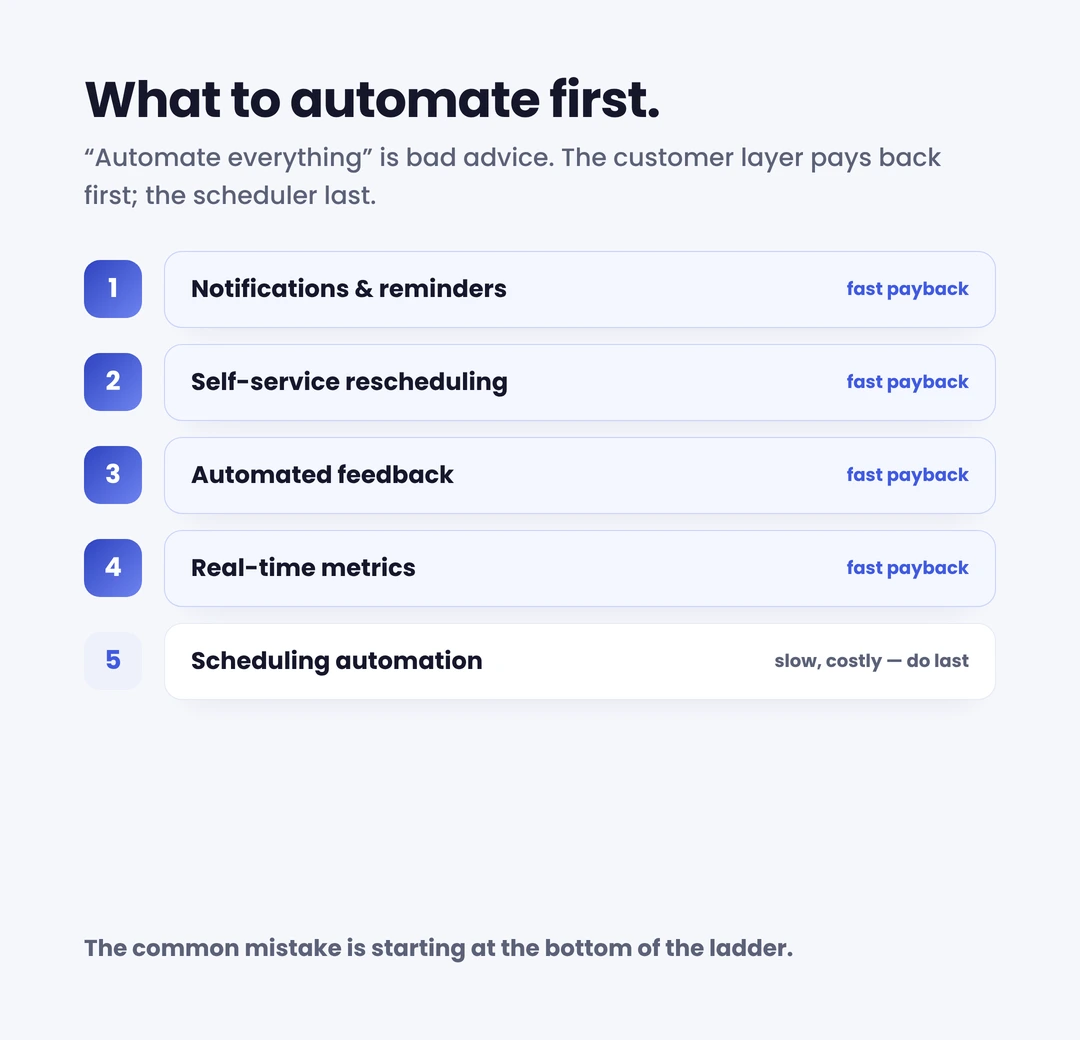
- A practical sequence: notifications → self-service appointment management → automated feedback capture → real-time metrics → then deeper scheduling automation.
- You don’t have to replace your workforce-management system to automate the customer experience; you add a customer-facing layer on top of it.
Should you automate everything in your field operation? No – and the teams that try usually stall. They start with the hardest, most expensive thing (the scheduling and routing engine), spend a year on integration, and the customer waiting at home for a four-hour window notices nothing. Meanwhile the contact centre is still drowning in “where’s my engineer?” calls that no one has touched.
Field service automation is worth doing. The field service management market is worth around USD 5.1 billion in 2025 and forecast to reach USD 9.17 billion by 2030, a compound annual growth rate of 12.5% (MarketsandMarkets, November 2025), and automation is the engine of that growth. But the order matters more than the ambition. This guide defines field service automation, then answers the question the vendor explainers skip: of everything you could automate, what should you automate first for the fastest payback – and what you should be in no hurry to automate at all.
What is field service automation?
Field service automation is the use of software to carry out the recurring, rules-based tasks in field service management – so that scheduling, dispatch, customer communication, job updates and reporting happen automatically instead of through manual effort. Salesforce defines it as streamlining “important recurring tasks to improve efficiency and productivity in field operations,” spanning scheduling, dispatching, routing, communications, asset management and invoicing.
In practice, an automated field service operation covers a wide span: assigning the right engineer to the right job, optimising routes, pushing job updates to a mobile app, raising and closing work order management records, sending the customer a confirmation, and capturing feedback after the visit. The scope is broad – which is exactly why “automate field service” is too blunt an instruction. The useful question is which of these tasks returns the most, the fastest, for the least disruption.
What to automate first: the customer-communication layer
The fastest payback in field service automation is automating communication with the customer – not the scheduling engine. Here is the order that consistently delivers, highest-return first.
1. Automated notifications, confirmations and reminders
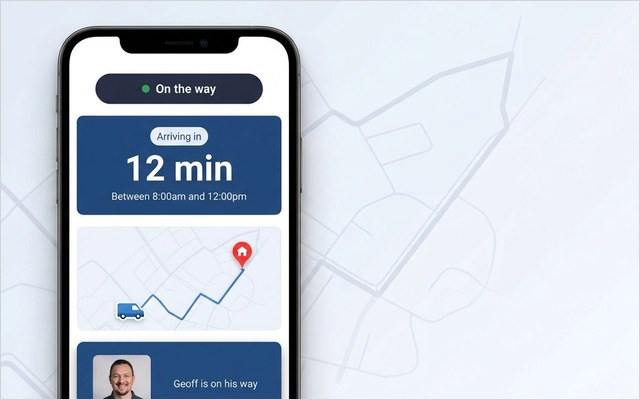
Automated confirmations, day-before reminders and “your engineer is on the way” notifications are the cheapest automation to switch on and the quickest to show a result. They attack the single most expensive problem in field service: the avoidable inbound call.
The maths is unforgiving. In a typical enterprise operation, 30–40% of appointments are changed by the customer and 10–15% are cancelled, and each change tends to generate a five-to-seven-minute call – frequently after hours (On My Way deployment research). In the UK, the average inbound contact-centre call costs around £5.58 (ContactBabel UK Contact Centre Decision-Makers’ Guide, 2024). Multiply that by thousands of “what time is my appointment?” calls a month and the cost of not automating communication becomes obvious. Reminders also cut no-shows directly: automated reminders cut missed appointments, and because SMS open rates run far higher than email, the message is far more likely to be seen in time to matter.
2. Self-service appointment management and rebooking
Once customers know when the engineer is coming, let them act on it without phoning anyone: book, reschedule, cancel and track, all self-serve. This is what customers now actively prefer: 81% want the brands they deal with to offer more self-service options, and around 67% prefer self-service to speaking to an agent for routine tasks (Document360 self-service research, 2025). Moving an appointment by a day should take a tap, not a ten-minute hold. Automate that, and a whole category of contact-centre work disappears while satisfaction rises.
3. Automated feedback capture
Automate the post-visit ask. A short NPS or CSAT prompt fired automatically the moment the job is closed surfaces problems while they are still recoverable – not in a churn report three months later. It costs almost nothing to run and turns every appointment into a data point, which feeds directly into the next priority.
4. Real-time metrics and reporting
Automate the measurement, not just the doing. Live dashboards for no-show rate, call-deflection rate, first-time fix rate and feedback scores replace the monthly spreadsheet scramble and show whether the automations above are working. You can’t improve what you can’t see in time to act on it.
The four fastest-payback automations are all customer-facing, and none of them touches the scheduling engine. They are quick to deploy, cheap to run, and they move both the cost line and the satisfaction line at once. That is why Foxtel reduced customer no-shows by 38% simply by giving customers reminders and easy rescheduling, and Bosch UK, with around 350 field engineers, cut ETA-related calls to its contact centre by 53% and reached 79% engagement with its appointment communications through automated tracking and self-service. Neither replaced its scheduling system to get there.
What not to over-automate
Automation has a failure mode, and it is automating the wrong things first – or automating away the human moments that build trust.
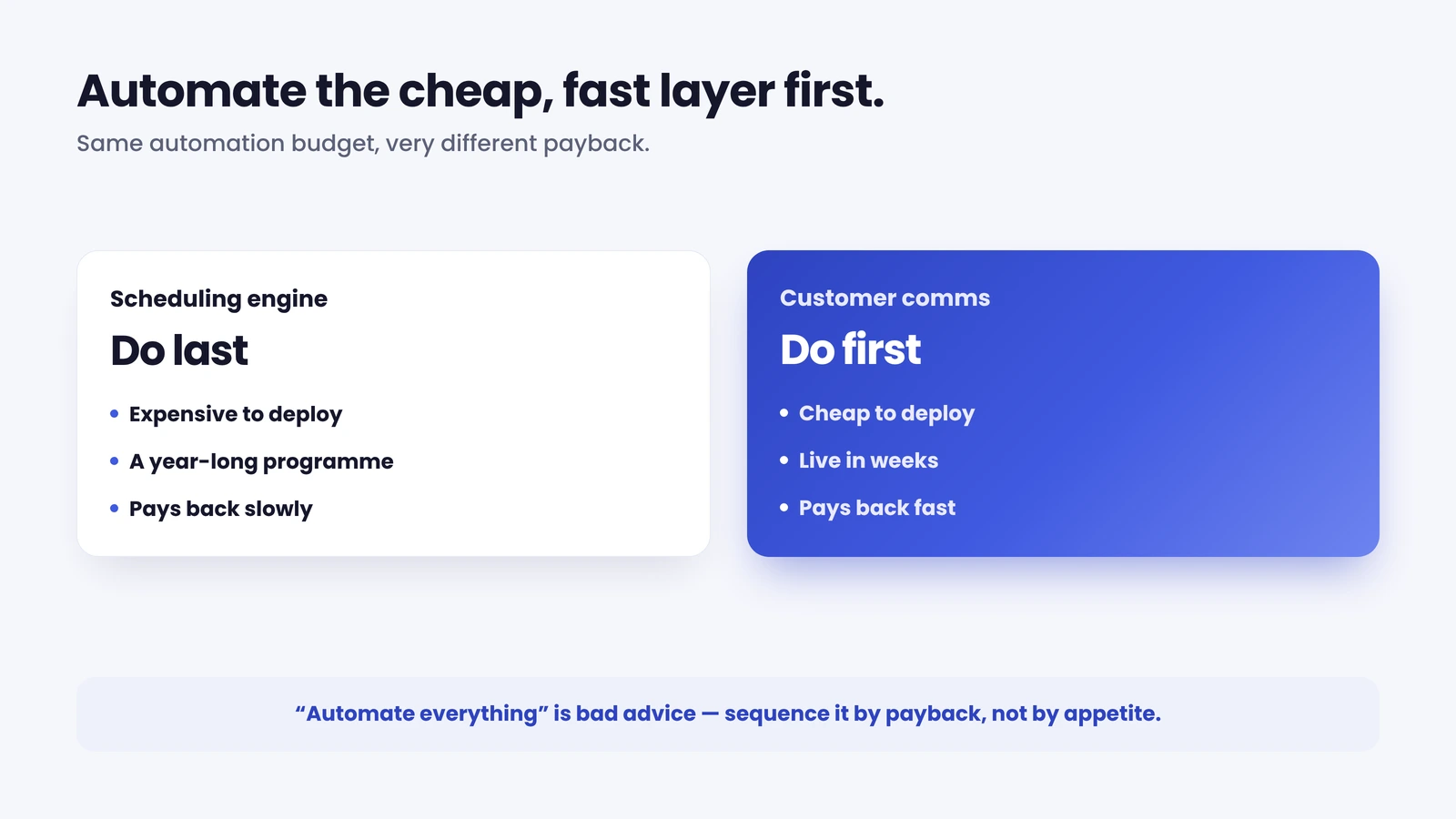
The classic mistake is leading with full scheduling and routing automation. It is genuinely valuable, but it is the most complex, most expensive and slowest-to-deploy automation in the stack, and the customer never sees it directly. Doing it first means a long, costly project before anyone (customer or contact centre) feels a difference. Sequence it after the quick wins have already paid for the programme.
Two more cautions. First, don’t automate the customer into a dead end: a poor self-service experience is worse than none, and 77% of consumers say an unhelpful bot or FAQ that wastes their time is worse than no self-service at all (Document360, 2025). Always leave a fast, obvious route to a human. Second, keep judgement where judgement belongs – complex diagnostics, sensitive complaints and high-value retention conversations are human work. The aim is to automate the repetitive coordination so your people have time for the interactions that actually need them, not to remove the people.
How to get started with field service automation
Automating a field operation is a sequence, not a single project. A practical order of operations:
Baseline the manual work first. Tag two weeks of inbound contact and bucket it – ETA enquiries, rescheduling, post-appointment, other. Most operations are surprised how much volume sits in the first two buckets, which is exactly what notifications and self-service deflect. That baseline also gives you the “before” number to prove the automation worked.
Automate communication before anything else. Confirmations, reminders and a live ETA are the fastest, cheapest wins and you’ll see call volume move within weeks. This is the proof-of-value that funds the rest of the programme.
Add self-service, then automated feedback. Once customers can move their own appointments and rate the visit automatically, you’ve removed a whole category of manual contact-centre work and started a continuous feedback loop.
Layer in real-time metrics, then deeper scheduling automation. With visibility in place and the quick wins banked, you can take on the bigger, slower automations (optimised scheduling and routing) on firmer ground.
Do it without ripping out your WFM. The common objection is that automating field service means replacing the scheduling system. It doesn’t. A customer-communication and self-service layer sits on top of whatever workforce-management platform you already run (Oracle, IFS, SAP, ServiceMax or Salesforce) and automates the customer experience without disrupting the operation underneath. That’s the model On My Way is built on; you can see how On My Way works before changing anything in your scheduling stack.
Measuring the impact of field service automation
Automation only counts if you can prove it moved a number, so define the measures before you switch anything on. The metrics that matter most are operational and customer-facing in equal part: call-deflection rate (routine enquiries handled by self-service rather than an agent), no-show / failed-visit rate, first-time fix rate, and NPS or CSAT captured straight after the visit.
Set the baseline first, then watch the curve. Communication and self-service automation typically move call volume within the first weeks of deployment, and the call reduction lands in the 40–55% range in the months after go-live – which is why On My Way underwrites a 35% reduction in appointment-related calls within 90 days, or we keep working at no cost until it’s hit. Pair the cost metric with the experience metric and look for where they move together: when a customer can track the engineer and reschedule in a tap, the call doesn’t happen and the satisfaction score rises. That is the signature of automation done in the right order.
See the fast-payback automation on your own operation. On My Way automates the customer-communication layer – confirmations, reminders, live tracking, self-service rescheduling and feedback – on top of your existing WFM, no rip-and-replace. Book a 30-minute working session (no slide deck) and we’ll map it to your appointment volume.
Frequently asked questions
What is field service automation? Field service automation is the use of software to handle the repetitive coordination tasks in field operations – scheduling, dispatch, work-order updates, customer notifications, feedback capture and reporting – automatically, instead of a person doing each step. It spans everything from route optimisation for engineers to confirmation messages for customers.
What should you automate first in field service? The customer-communication layer: automated confirmations, reminders, live ETA tracking and self-service rescheduling. It is the cheapest and fastest automation to deploy, and it attacks the most expensive problem – avoidable “where’s my engineer?” calls – while reducing no-shows and raising satisfaction. Scheduling-engine automation is valuable but slower and more costly, so it comes later.
What is field service automation software? It is the platform that runs the automation – some of it inside a workforce-management system (scheduling, dispatch, routing) and some of it in a dedicated customer-communication and self-service layer that handles notifications, tracking, rebooking and feedback. The two work together; the customer-facing layer can sit on top of an existing WFM without replacing it. When evaluating field service automation tools, weigh deployment speed and payback as heavily as feature lists – the customer-facing automations return value in weeks, not quarters.
Does field service automation mean replacing my scheduling system? No. You can automate the highest-value parts – customer communication, self-service and feedback: by adding a layer on top of your existing WFM (Oracle, IFS, SAP, ServiceMax, Salesforce and others). This is far faster and lower-risk than ripping out core scheduling and dispatch systems.
How much can field service automation save? The clearest savings come from call deflection and fewer failed visits. With UK inbound calls averaging around £5.58 each, deflecting routine ETA and rescheduling calls adds up quickly; enterprise deployments typically see appointment-related calls fall by 40–55%, and no-shows drop by roughly a third with automated reminders and self-service rebooking.
What should you not automate in field service? Don’t lead with full scheduling and routing automation (it’s the slowest, costliest win), don’t automate customers into a dead end with no route to a human, and don’t automate away complex diagnostics, sensitive complaints or high-value retention conversations – those are human work. Automate the repetitive coordination so people have time for the interactions that need them.
References
- MarketsandMarkets — Field Service Management Market worth $9.17 billion by 2030 (November 2025)
- Salesforce — What Is Field Service Automation? Benefits and Key Components (2025)
- ContactBabel — The UK Contact Centre Decision-Makers’ Guide (2024), average inbound call cost. Reported via Call Centre Helper
- Document360 — Top 2025 Self-Service Statistics & Their Importance (2025)
- Aquant — 2024 Field Service Benchmark Report (January 2024), first-time fix benchmarks
- Esendex — SMS open rates compared with email (2024)
- On My Way / Leadent Digital — enterprise deployment data (appointment-change volume; client outcomes).

Keep your WFM. Upgrade what your customers experience.
On My Way is the customer-experience layer for field service: live arrival tracking, self-service rebooking, notes and photos, and feedback — added on top of the scheduling system you already run. No rip-and-replace, live in 4–6 weeks.