Dynamics 365 Field Service: Adding Customer Self-Service

Quick answer: Dynamics 365 Field Service is Microsoft’s enterprise field-service platform — strong on scheduling, work orders, IoT-driven maintenance and the technician mobile app. Where it leaves room is the customer-facing experience: its self-scheduling portal is built on Power Pages, still a preview feature, sends status updates by email only, and books single-resource jobs rather than crews. You don’t have to replace D365 to close that gap. A customer-communication layer like On My Way sits on top of Dynamics 365 Field Service through its API and Dataverse, adding real-time tracking, SMS-and-email self-service rescheduling and post-visit feedback — without touching how D365 schedules or dispatches a single job.
Key takeaways
- Dynamics 365 Field Service (D365 FS) is built to run the operation — scheduling, work orders, assets, IoT and a capable mobile app for technicians.
- Its native customer portal exists, but the self-scheduling experience is a preview feature on Power Pages, with email-only notifications and single-resource bookings.
- The fastest way to a consumer-grade customer experience is to add a layer on top of D365, not to rebuild inside it.
- On My Way integrates via the Dynamics API and Dataverse, so the appointment data already in D365 drives tracking, rescheduling and feedback — with no disruption to scheduling.
- A typical integration goes live in 4–6 weeks, and the customer experience improves without an FSM migration.
If you run field service on Microsoft’s stack, you’ve made a sound platform choice. Dynamics 365 Field Service is one of the most capable systems on the market for the work behind the appointment, and the field-service software market it sits in is forecast to grow from USD 5.1 billion in 2025 to USD 9.17 billion by 2030 (MarketsandMarkets, November 2025). Investment is pouring into scheduling intelligence, IoT and AI — almost all of it pointed at the operation, not at the person waiting at home.
That’s the gap worth closing. D365 can optimise a route to the minute and still leave the customer wondering whether anyone is coming. This article looks at what Dynamics 365 Field Service does well, where its customer-facing layer runs thin, and how you add a consumer-grade experience on top while keeping the platform you’ve already invested in.
What does Dynamics 365 Field Service do?
Dynamics 365 Field Service manages the end-to-end service operation: it turns a service need into a work order, schedules the right resource, guides the technician through the job, and feeds the results back into Dynamics. Microsoft positions it around work-order management, resource scheduling, asset tracking and a mobile app for frontline workers (Microsoft Learn).
Four areas are genuinely strong:
- Scheduling and dispatch. Manual, assisted and fully automated scheduling, with a Resource Scheduling Optimization add-in and, more recently, agentic scheduling and Copilot assistance for dispatchers.
- Work-order management. The operational spine — incident types, requirements and assets all model what a job needs before anyone is sent.
- IoT and predictive maintenance. Through Connected Field Service, sensor data can trigger an alert and auto-generate a work order before a customer notices a fault — the often-cited example being an HVAC unit flagging low refrigerant and booking a visit pre-emptively.
- The technician mobile app. iOS, Android and Windows, with offline capture that syncs when the device reconnects, plus AI-generated job summaries for technicians and managers.
For dispatch, asset intelligence and technician productivity, D365 FS is enterprise-grade. None of what follows argues otherwise.
Where Dynamics 365 Field Service leaves a customer-experience gap
The gap is on the customer’s side of the appointment, not the operation’s. D365 FS does ship a customer portal, but read Microsoft’s own documentation closely and three constraints stand out for a high-volume B2C operation.
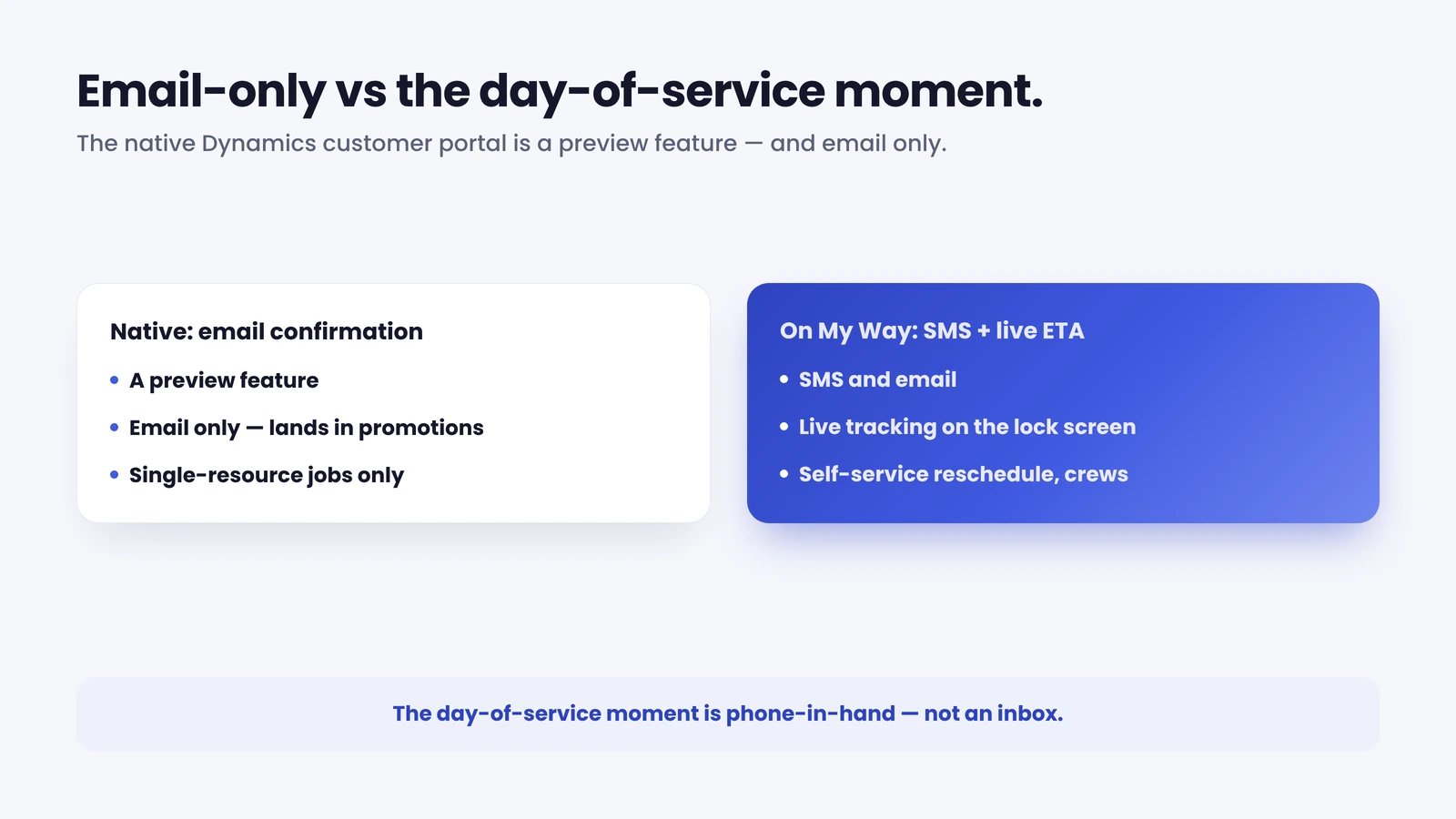
First, the self-scheduling portal is built on Power Pages and is still a preview feature. Microsoft’s documentation is explicit that preview features “aren’t meant for production use and may have restricted functionality” (Microsoft Learn, October 2025). For an enterprise running tens of thousands of appointments a month, “preview” is a meaningful caveat.
Second, notifications are email only. The portal invitation, by Microsoft’s own note, “is sent only as email, not as a sms/text message.” Field-service appointments are a phone-in-hand, day-of-service moment, and an email confirmation that lands in a promotions folder is not the channel a customer checks when they’re wondering whether to leave the house.
Third, the native self-scheduling books single-resource jobs only. Per the documented limitations, scheduling “works only for user resources” and “doesn’t support incident types requiring crews or multiple resources.” Two-person installs, crewed maintenance and multi-skill visits — common in utilities, telecoms and home services — fall outside it.
None of this is a flaw in how D365 runs the operation. It’s simply that the platform is built dispatch-out, and the consumer-grade, SMS-first, self-serve experience customers now expect is a different job. The expectation has been set elsewhere: people who track a parcel to the doorstep in real time don’t see why they can’t track the engineer attending a far more important repair. We unpack that shift in our guide to field service customer experience.

What “good” looks like for the customer
A consumer-grade field-service experience is consistent across sectors, and it maps onto the same appointment data D365 already holds:
- Booking and confirmation the customer can see and trust — on whatever device they have to hand.
- Reminders ahead of the day, on the channel they actually read — which, for time-critical appointments, means SMS as well as email.
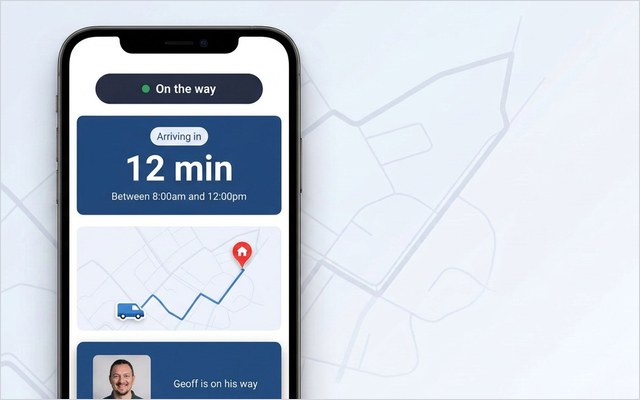
- A live ETA on the day, so “where’s my engineer?” is answered before it’s asked.
- Self-service rescheduling in a few taps, without a phone call or a queue.
- Post-visit feedback captured immediately, while the experience is fresh and a problem is still recoverable.
Each one is a customer-experience win and an operational lever at the same time. A reminder reduces no-shows. A live ETA deflects the inbound call. Self-service rescheduling removes a whole category of contact-centre work. The point isn’t to bolt on features; it’s to turn the appointment from a black box into something the customer can see and control.
How On My Way adds self-service on top of Dynamics 365
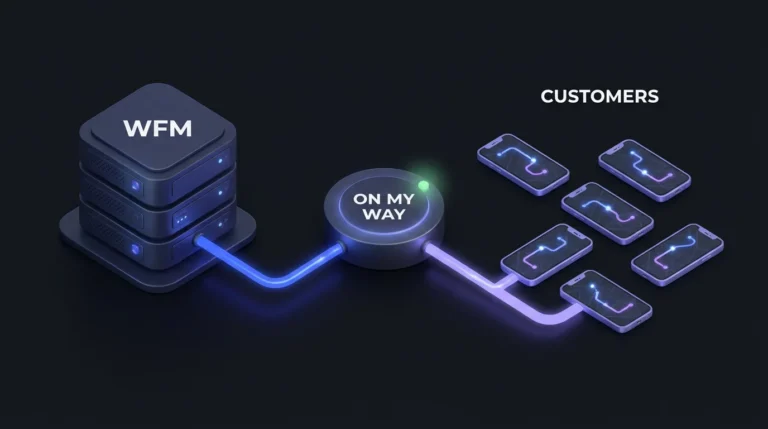
On My Way is a customer-communication and self-service layer that sits on top of your existing workforce-management system rather than replacing it. With Dynamics 365 Field Service, the integration reads from the platform you already run.

It connects through the Dynamics API and Dataverse. The appointment data that D365 FS already maintains — bookings, statuses, resource and travel information — flows into On My Way, which turns it into the customer-facing experience: a browser-based tracking and self-service portal with no app to download.
Customers get the consumer-grade layer. Real-time technician tracking and live ETAs; SMS and email confirmations and reminders, not email alone; self-service rescheduling and cancellation that writes back to the schedule; and instant post-visit NPS or CSAT feedback. Because it’s browser-based, there’s nothing for the customer to install.
Dispatch doesn’t change. D365 stays the system of record for scheduling, work orders, assets and the technician app. On My Way doesn’t re-implement any of that — it adds a communication and self-service tier above it, which is why it’s a low-risk change for an IT team protecting a working platform. This is the WFM-agnostic model the product is built on; the same approach works across any workforce-management system, and the specifics of the Microsoft connection live on our Dynamics 365 integration page.
See it on your Dynamics environment. On My Way adds real-time tracking, SMS-and-email self-service rescheduling and instant feedback on top of D365 Field Service — no rip-and-replace, no change to dispatch. Book a demo and we’ll walk it through against your setup.
What it takes to go live
The integration is designed to be quick and low-disruption, because it doesn’t touch the operational core. A typical On My Way deployment goes live in 4–6 weeks, with a six-week pilot option for teams that want to prove the numbers on a single region or service type before rolling wider. There’s no FSM migration, no re-platforming and no change to how Dynamics schedules a job — the work is in connecting to the API, mapping your appointment statuses and branding the customer experience. You can see the end-to-end model in how On My Way works.
The results are measurable, and they follow the same pattern wherever customers are given a clear view of the appointment and a way to act on it. Foxtel, an Australian telecom operator, cut customer no-shows by 38% after giving customers reminders and easy rescheduling. E.ON, a UK energy and utilities provider, improved appointment-based first-time job completion by 19% by getting the right information in front of the engineer before arrival. In both cases the lever is the same: take the uncertainty out of the appointment, and the chasing, the missed slots and the repeat visits all ease off. It’s why On My Way underwrites a 35% reduction in appointment-related calls within 90 days, or we keep working at no cost until it’s hit.
The bottom line
Dynamics 365 Field Service is a strong platform, and there’s no reason to leave it. The customer experience around the appointment is a separate layer from the operation that schedules it — and adding that layer is far faster and lower-risk than rebuilding it inside D365 or migrating away. Keep Dynamics for what it does well. Add the consumer-grade tracking, self-service and feedback on top, and you close the one gap your customers actually feel.
If you run Dynamics 365 Field Service today, the On My Way Dynamics 365 Field Service customer portal adds live engineer tracking, self-service rebooking and automated notifications on top of your existing deployment, with no Power Pages build.
Related reading: adding customer self-service to Salesforce Field Service, IFS Cloud and field service and how field service teams are cutting inbound calls.
Frequently asked questions
Does Dynamics 365 Field Service have a customer portal? Yes. D365 FS includes a customer portal built on Power Pages where customers can book, manage, reschedule and cancel appointments, track a dispatched technician and leave feedback. Per Microsoft’s documentation, the self-scheduling capability is still a preview feature, its notifications are email only, and it books single-resource jobs rather than crews — which is why high-volume B2C operations often add a dedicated customer-experience layer on top.
Can you add SMS notifications to Dynamics 365 Field Service? Not through the native self-scheduling portal, whose invitation and status updates are email only by Microsoft’s own note. A customer-communication layer such as On My Way connects via the Dynamics API and adds SMS as well as email confirmations, reminders and live-ETA alerts — the channel customers actually check on the day of service.
Do you have to replace Dynamics 365 to improve the customer experience? No. On My Way sits on top of D365 Field Service via the Dynamics API and Dataverse, adding tracking, self-service rescheduling and feedback without changing how Dynamics handles scheduling, work orders or dispatch. It’s an addition, not a migration.
How does On My Way integrate with Dynamics 365 Field Service? It reads the appointment, status and resource data D365 already holds through the Dynamics API and Dataverse, then turns that data into a browser-based customer experience — live tracking, self-service rescheduling and post-visit feedback. Dynamics remains the system of record; On My Way adds the customer-facing tier above it.
How long does the Dynamics 365 integration take to go live? A typical On My Way deployment goes live in 4–6 weeks, with a six-week pilot option to prove results on one region or service type first. Because it doesn’t alter the operational core, it avoids the timeline and risk of an FSM migration.
References
- Microsoft Learn — Overview of Dynamics 365 Field Service.
- Microsoft Learn — Dynamics 365 Field Service portal overview (known limitations; updated 20 Oct 2025)
- Microsoft Learn — Enable self-scheduling service appointments in Dynamics 365 Field Service (preview) (updated 20 Oct 2025)
- Microsoft Learn — Set up notifications for the Field Service portal.
- Microsoft — New and planned features for Dynamics 365 Field Service, 2025 release wave 2.
- MarketsandMarkets — Field Service Management Market worth $9.17 billion by 2030 (November 2025)
- On My Way / Leadent Digital — enterprise deployment data (client outcomes).

Keep your WFM. Upgrade what your customers experience.
On My Way is the customer-experience layer for field service: live arrival tracking, self-service rebooking, notes and photos, and feedback, added on top of the scheduling system you already run. No rip-and-replace, live in four to six weeks.