HVAC Software: The Complete Guide

Quick answer: HVAC software is the technology a heating, ventilation and air-conditioning service operation uses to run its work — scheduling jobs, dispatching engineers, managing work orders, tracking parts and handling maintenance contracts. The category is usually sold as HVAC field service management (FSM) software. For an enterprise HVAC operation running hundreds of engineers, the right platform is the difference between a schedule that holds through a July heatwave and one that collapses into missed appointments and overtime. But most HVAC software stops at the back office. The part that decides whether the customer comes back, keeping them informed about the appointment, is the piece teams most often leave out.
Key takeaways
- HVAC software covers scheduling, dispatch, mobile work orders, parts and maintenance-contract management: the operational backbone of a heating and cooling service business.
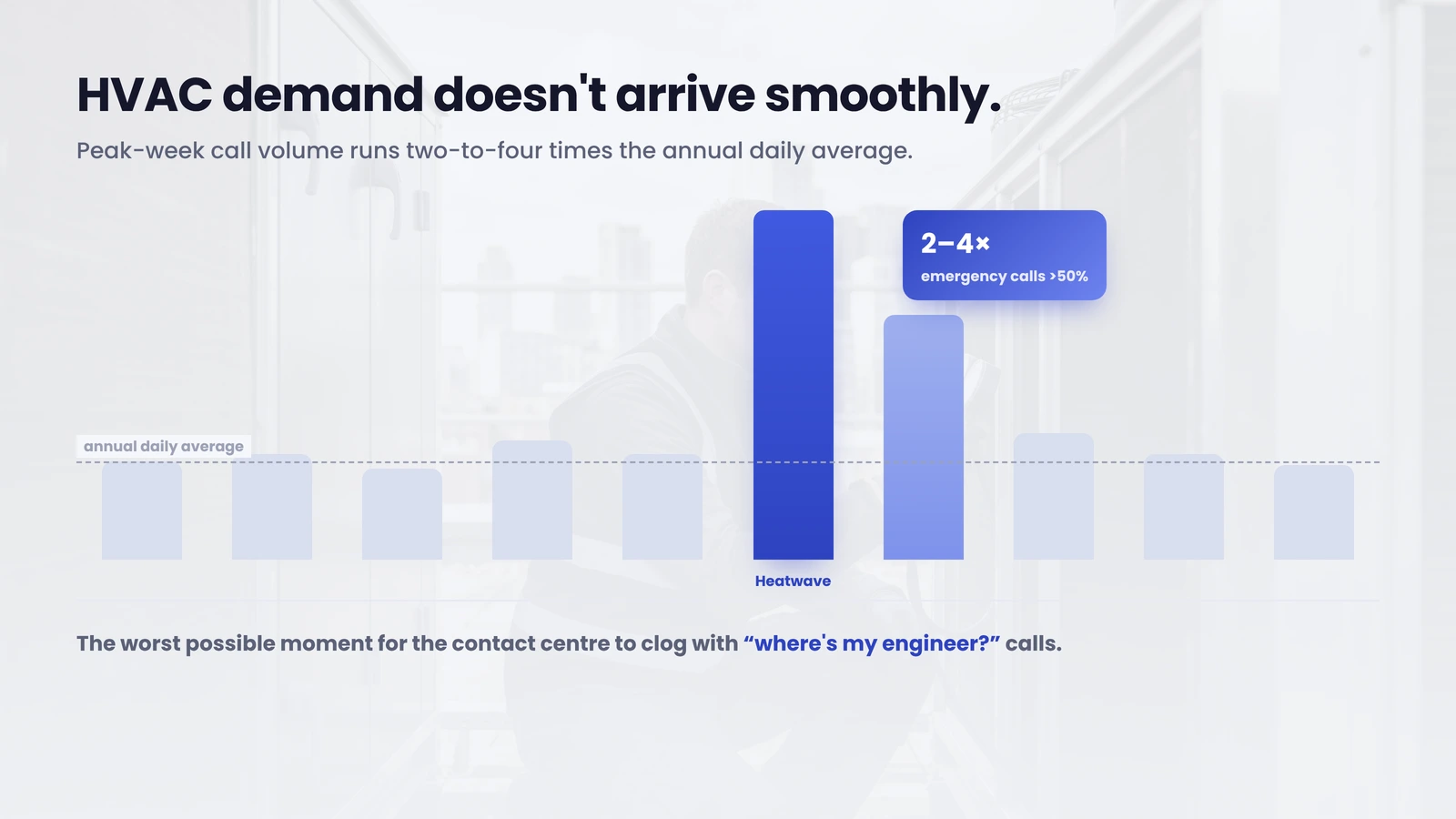
- HVAC demand is sharply seasonal: peak-week call volume runs two-to-four times the annual daily average, so the software has to absorb spikes without dropping appointments.
- The biggest gap in most HVAC platforms is the customer-communication layer (tracking, self-service rescheduling and feedback), which is where avoidable cost and lost loyalty live.
- Bosch UK cut ETA-related calls to its contact centre by 53% by adding that layer on top of its existing system, without replacing the scheduler underneath.
- Enterprise operations don’t need to rip out their workforce-management system to fix the customer experience; they add to it.
The field service management market that HVAC software sits inside is large and growing fast: worth USD 5.10 billion in 2025 and forecast to reach USD 9.17 billion by 2030, a 12.5% compound annual growth rate (MarketsandMarkets, 2025). Heating and cooling is one of its biggest verticals, and in the UK it’s getting bigger: the domestic HVAC market is valued at roughly GBP 2.52 billion in 2025, with the heat-pump segment alone hitting a record 125,000-plus units in 2025, up 27% year on year (Heat Pump Association, 2026). More installed equipment means more service visits, more maintenance contracts and more appointments to coordinate.
That coordination is where HVAC software earns its keep. It also has a harder job here than in most industries, because HVAC demand doesn’t arrive smoothly. It arrives in waves, and the software either holds up when the first heatwave hits, or it doesn’t.
What is HVAC service software?
HVAC service software is a field service management platform built for the specific workflow of installing, maintaining and repairing heating, ventilation and air-conditioning equipment. It connects the office and the field: a job is booked, an engineer is scheduled and routed, the work order travels to their device, parts are tracked, and the visit is invoiced and recorded against the asset and any maintenance contract.
At the smaller end of the market, HVAC business software is sold as an all-in-one tool for a contractor with a handful of vans: scheduling, invoicing and payments in one app. At the enterprise end, where an operation runs hundreds of engineers across regions, HVAC management software is usually a serious workforce-management platform (Oracle Field Service, IFS, SAP, ServiceMax or Salesforce Field Service) with the scale, integrations and reporting a large service business needs. The core functions are the same. The difference is volume, complexity and how much it costs when something goes wrong.
This guide is written for that enterprise end: operations where a dropped appointment isn’t one annoyed customer but a pattern that shows up in the contact-centre numbers and the churn report.
The core features of HVAC software
Good HVAC field service management software does a defined set of jobs well. The features below are the backbone, the things any serious platform has to handle.
- Scheduling. Drag-and-drop, colour-coded calendars that assign the right engineer to the right job, with the skills and certifications the work requires. For HVAC, scheduling also has to flex hard for seasonal peaks and emergency same-day demand.
- Dispatch and routing. Map-based dispatch that assigns jobs by location and builds efficient routes, cutting drive time between calls, which matters when an engineer might cover ten to twelve jobs in a peak-season day.
- Mobile work orders. The job in the engineer’s hand: details, history, checklists, photos, asset records and time tracking, available on site whether or not there’s signal.
- Parts and inventory. Knowing what’s on each van and in each store, so an engineer arrives with the right component, the single biggest determinant of whether a fault is fixed on the first visit.
- Maintenance contracts and planned visits. HVAC runs on recurring maintenance: seasonal services, compliance checks, planned preventive visits. The software schedules them automatically, prompts renewals and tracks each contract against the equipment it covers.
- Asset and equipment history. A record of every unit, its service history and warranty status, so the engineer who turns up in January knows what happened in the July before.
- Invoicing and reporting. Generating invoices, taking payment and rolling job data up into the metrics a service manager runs the operation on.
Get these right and the operation runs. One thing is absent from that list, though, and it’s absent from most HVAC platforms too.

The customer-communication layer HVAC teams miss
The features above all point inward. They organise the engineer, the van, the parts and the schedule. None of them tell the customer what’s happening, and in field service the customer experience is mostly built from exactly that: whether anyone kept them informed.
That gap carries a real cost. In a typical enterprise field-service operation, 30–40% of booked appointments are changed by the customer and a further 10–15% are cancelled, with each change tending to generate a five-to-seven-minute call to the contact centre, frequently outside business hours (On My Way deployment research). Layer on the customers who simply ring to ask when the engineer will arrive, and a large share of an HVAC contact centre’s volume turns out to be questions the customer could have answered themselves, if anyone had given them visibility.
It compounds in HVAC because of the seasonality. When the first heatwave lands, peak-week call volume runs two-to-four times the annual daily average, and the share of calls classed as emergency or same-day can climb above 50% (Samsara, 2024). That’s the worst possible moment for the contact centre to be clogged with “where’s my engineer?” enquiries that proactive communication would have prevented.
The customer-communication layer closes the gap. It’s a defined set of capabilities that sit on top of the scheduler:
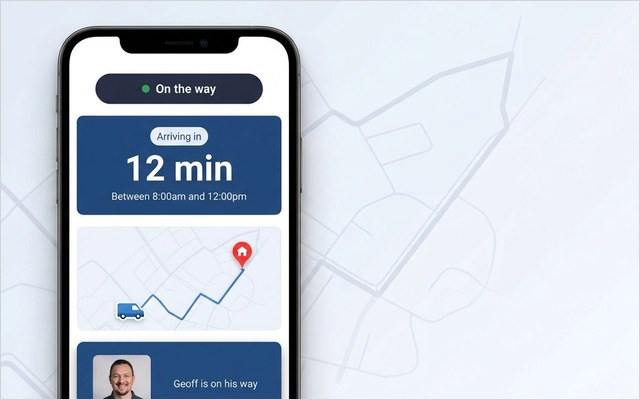
- Live tracking. The customer sees the engineer’s ETA on the day, the way they track a parcel, removing the anxious wait and the call that comes with it. See live technician tracking.
- Self-service rescheduling. The customer moves their own appointment in seconds instead of phoning, which removes a whole category of contact-centre work.
- Proactive notifications. Confirmations, reminders and a “your engineer is on the way” message that cut no-shows and pre-empt the ETA call.
- Feedback capture. A quick post-visit rating that surfaces a problem while it’s still fixable, not in a churn report three months later.
These capabilities are what most HVAC software leaves out, even though they decide how the visit actually feels to the customer. We go deeper on the discipline behind it in our guide to field service customer experience.
See the customer layer on your stack. On My Way adds live tracking, self-service rescheduling and feedback on top of your existing HVAC scheduling system — no rip-and-replace. Book a 30-minute working session and we’ll map it to your operation.
How leading HVAC operations use technology
The HVAC operations that get the most from their software treat it as two connected layers, not one. The workforce-management platform runs the work; a customer-facing layer runs the experience. Keeping the two distinct is what lets a large operation modernise the customer experience without destabilising the scheduling engine its whole business depends on.
In practice that looks like a few deliberate choices. They schedule maintenance contracts proactively rather than waiting for the phone to ring, smoothing the seasonal peaks by booking planned visits into the quieter months, which is also a natural moment to confirm and remind customers automatically rather than chasing them. They get the right information to the engineer before arrival, because the fastest route to a higher first-time fix rate is making sure the engineer turns up with the right part and the full equipment history. And they communicate by default, so the customer is never left guessing: the cheapest, highest-return upgrade an HVAC operation can make to its service experience.
The technology to do all this exists and integrates. What separates the leaders is treating customer communication as a first-class function with its own tools and metrics, rather than an afterthought bolted onto a dispatch screen.
How to choose an HVAC software platform
For an enterprise HVAC operation, the platform decision comes down to a handful of questions that matter more than the feature checklist every vendor will wave at you.
Does it scale with your volume and your peaks? A platform that’s comfortable with fifty engineers may buckle at five hundred, and one that handles a steady week may drop appointments when call volume quadruples in a heatwave. Test it against your peak, not your average.
Does it integrate with what you already run? Most large HVAC operations already have a workforce-management system they’ve invested years in. The question is rarely “what should replace it”; it’s “what works with it”. A platform that demands a rip-and-replace of your scheduler is a multi-year project; a layer that sits on top is a multi-week one.
Does it cover the customer, not just the back office? This is the question most feature comparisons skip. Ask specifically: can the customer track the engineer, reschedule themselves, and give feedback — without phoning? If not, you’re buying half a platform and keeping the contact-centre cost.
Can the vendor prove it? Ask for deployment data from operations like yours, at your scale. Feature lists are easy to write; outcomes are not. (For trade-specific detail that overlaps heavily with HVAC, see our guides to gas engineer software, plumbing software and electrician software — gas certification, compliance and dispatch all carry across.)
The honest answer for many enterprise operations is that they don’t need a new HVAC platform at all. They need to add the customer layer their current platform lacks, which is faster, cheaper and far lower-risk than replacing core systems.
What good looks like: an enterprise HVAC result
The pay-off from adding the customer-communication layer is measurable, and it shows up on both the experience side and the cost side at once.
Bosch UK, running around 350 field engineers, added a self-service and live-tracking layer on top of its existing scheduling system. It cut ETA-related calls to the contact centre by 53% and lifted engagement with its appointment communications to 79%, without replacing the workforce-management platform underneath.
When customers can see the ETA and move their own appointment, the reasons they phone in largely fall away, and the post-visit scores climb because the day went the way they were told it would. That result isn’t a one-off. Across enterprise field-service deployments, call reduction typically lands in the 40–55% range within the first months — which is why On My Way underwrites a 35% reduction in appointment-related calls within 90 days, or it keeps working at no cost until the number is hit.
The bottom line
HVAC software is the operational backbone of a heating and cooling service business: scheduling, dispatch, mobile work orders, parts and maintenance contracts. Get it right and the operation runs, even through the seasonal peaks that define the industry. But the backbone organises the engineer, not the customer, and in field service the customer experience is mostly built from communication the back-office tools don’t provide.
For an enterprise HVAC operation, the highest-return move usually isn’t replacing the platform. It’s adding the customer-communication layer — tracking, self-service, notifications and feedback — on top of the system already in place. You can see how On My Way works and how it fits an HVAC field service operation, then decide whether your next project is a rip-and-replace or a fortnight’s integration.
Ready to see the numbers on your operation? On My Way layers real-time tracking, self-service rescheduling and feedback onto your existing HVAC platform. Book a demo or request a quote — a 30-minute working session, no slide deck.
Frequently asked questions
What is HVAC software?
HVAC software is a field service management platform built for heating, ventilation and air-conditioning service operations. It handles scheduling, dispatch and routing, mobile work orders, parts and inventory, maintenance contracts and invoicing — connecting the back office to the engineer in the field. At enterprise scale it’s usually a workforce-management platform such as Oracle Field Service, IFS, SAP or ServiceMax.
What is the difference between HVAC software and HVAC field service management software?
They’re largely the same thing — “HVAC field service management software” is the precise category name, while “HVAC software” and “HVAC business software” are the everyday terms. All describe the technology that runs an HVAC service operation. The main distinction in practice is scale: all-in-one tools for small contractors versus enterprise workforce-management platforms for operations running hundreds of engineers.
What features should enterprise HVAC software have?
The operational core is scheduling, map-based dispatch and routing, mobile work orders, parts and inventory tracking, maintenance-contract and planned-visit management, asset history and reporting. The feature most enterprise teams under-weight is the customer-communication layer — live tracking, self-service rescheduling, proactive notifications and feedback — which is where avoidable contact-centre cost and customer churn are won or lost.
Do you need to replace your existing system to improve the HVAC customer experience?
No. The customer-communication layer can sit on top of the workforce-management platform you already run — Oracle, IFS, SAP, ServiceMax or Salesforce — adding tracking, self-service and feedback without disrupting scheduling or dispatch. For most enterprise operations that’s a multi-week integration rather than a multi-year replacement project.
How does HVAC software handle seasonal demand?
The scheduling and dispatch engine flexes capacity for peaks — peak-week HVAC call volume can run two-to-four times the annual daily average — while maintenance-contract management lets operations book planned visits into quieter months to smooth the curve. Proactive customer communication matters most here too, because it keeps the contact centre from being overwhelmed by “where’s my engineer?” calls exactly when demand spikes.
How much can the customer-communication layer reduce contact-centre calls?
Enterprise field-service deployments typically see appointment-related calls fall by 40–55% within the first months. Bosch UK, with around 350 engineers, cut ETA-related calls to its contact centre by 53%. On My Way underwrites at least a 35% reduction within 90 days, or it keeps working at no cost until the target is met.
Is HVAC software worth it for a large operation?
For an operation running hundreds of engineers, the question is less “is software worth it” — it almost certainly already runs a platform — and more “is it covering the customer”. The operational backbone is table stakes; the measurable returns at enterprise scale increasingly come from the customer-communication layer that cuts calls, reduces no-shows and protects retention.
References
- MarketsandMarkets — Field Service Management Market worth $9.17 billion by 2030 (USD 5.10B in 2025 → USD 9.17B by 2030, 12.5% CAGR; published Nov 2025)
- Heat Pump Association (UK) / Altoenergy — UK Heat Pump Market Reaches Record Levels in 2025 (125,000+ units, +27% YoY)
- Mordor Intelligence — United Kingdom HVAC Market (UK HVAC market ~GBP 2.52B, 2025)
- Samsara — The real peak season for HVAC? It’s not when you think (peak-week call volume 2–4x the daily average; emergency share)
- ServiceTitan — Best HVAC Service Software & Mobile App (core HVAC software feature set: scheduling, dispatch, mobile, maintenance contracts)
- CompareSoft — What Is First-Time Fix Rate & How to Improve Your FTFR (parts/information as the first-time-fix determinant; ~80% average)
- On My Way / Leadent Digital — enterprise deployment data (appointment-change volume; HVAC client outcomes).

Keep your WFM. Upgrade what your customers experience.
On My Way is the customer-experience layer for field service: live arrival tracking, self-service rebooking, notes and photos, and feedback — added on top of the scheduling system you already run. No rip-and-replace, live in 4–6 weeks.