Electrician Software: The Complete Guide

Quick answer: Electrician software is a job-management platform for electrical service businesses. It schedules and dispatches work, gives engineers a mobile app for job sheets, photos and test certificates (EICR, minor works, installation certificates), and runs quoting, invoicing and job history in one place. At scale, a customer-communication layer on top turns every visit into a tracked, self-serve appointment.
Across enterprise field service, the average first-time fix rate is 76% — the best operations reach 87%, the weakest 55% (Aquant Field Service Benchmark, 2024). For an electrical operation that gap is the whole game. A failed first visit turns one appointment into 2.7 and pushes resolution out by 13 days (Aquant, 2024). Multiply that across a sizeable field workforce running installations, periodic inspections and reactive fault calls, and every avoidable return trip becomes a line on the operations report. None of that is an electrical problem. It’s a software gap — and it’s exactly the gap electrician software is meant to close.
This guide covers what electrician software is, the features that matter, how compliance and certification work under UK electrical standards, and the layer most large electrical operations buy last when they should buy it first: the customer-communication and self-service layer that connects the booked job to the customer waiting at home.
What is electrician software?
Electrician software is a field-service platform tailored to electrical contracting and service work. You’ll see the same product sold as job management software for electricians, electrical job management software, or electrical contractor software, depending on which part of the workflow the vendor leads with. At its core it does what any field service management system does — schedule work, dispatch engineers, capture what happened on site, raise the invoice — but it adds the trade-specific pieces an electrical business can’t operate without: industry-standard test certificates, inspection records, and circuit-level history against an asset.
The market splits into two tiers. Tools for sole traders digitise the diary, quote pad and certificate book. At the enterprise end — facilities and maintenance providers, social-housing electrical teams, national installation and EV-charging networks, and the service arms of larger contractors — the software is one part of a larger stack, integrating with a workforce-management (WFM) system, an ERP and a contact centre. The trade specifics are similar; the scale, the integration demands and the cost of a missed visit are not. This guide is written for that second tier, where the question isn’t whether to digitise but which capabilities actually move your operational and customer numbers.
The core features of electrician software
A capable platform covers four functional areas, plus the reporting layer that ties them together. Treat it as a checklist.
- Scheduling and dispatch. Skills-aware job allocation, so a periodic inspection or three-phase fault only goes to a qualified engineer. Electrician scheduling software earns its keep at scale through route optimisation: a few percent off travel time across a large van fleet frees real capacity for more first-time fixes.
- Mobile job management. An electrician app the engineer uses on site for job details, circuit history, photos, parts, readings, signatures and certificate capture — working offline and syncing when it reconnects.
- Certificates, quotes and invoicing. Pre-filled, industry-standard records sent the same day (EICR, minor works, installation certificates), plus a quote-to-invoice flow so a finished job becomes a bill without re-keying.
- Parts, stock and reporting. Van-stock tracking and parts-to-job linking so the consumer unit or run of armoured cable is recorded against the job, not in someone’s head — backed by a searchable record of who did what, when, against which circuit.
Most platforms do the first three reasonably well. Two things separate them at enterprise scale: how rigorously they handle certification, and whether they do anything for the customer.

Mobile tools for electricians
The mobile app is where value is won or lost, because it’s where the engineer works — but at enterprise scale the deciding capability isn’t feature count, it’s integration. A solo electrician can run their whole business on a standalone app; a facilities provider on Oracle, IFS or SAP can’t, because it already has a WFM dispatching the work. The app has to fit that workflow rather than replace it, pushing job data, photos and certificates back into the system of record — and, for real field use, it has to work offline (basement risers and rural sites won’t have reliable data) and pre-fill the records the system already holds.
Compliance and certification: EICR and test certificates
Here is the trade-specific core. Electrical work in the UK is governed by BS 7671, the wiring regulations, and compliance is proved through standard certificates: the Electrical Installation Condition Report (EICR) for periodic inspection, the Electrical Installation Certificate for new work, and the Minor Electrical Installation Works Certificate for smaller jobs. For rented homes an EICR is a legal requirement — landlords in England must have the fixed wiring inspected at least every five years and give the report to tenants and, on request, the local authority. Electrical job management software turns that obligation into a few taps: the engineer completes the certificate on the mobile app, pre-filled with the property and circuit data, and the record is generated, stored and sent the same day.

For an enterprise the value isn’t only speed — it’s the audit trail. When you’re issuing large volumes of certificates across a distributed workforce, you need to prove on demand that every installation was inspected by a qualified engineer, that the report reached the customer, and that any C1 or C2 defect was made safe and followed up. A digital system makes that a search query; a paper process makes it a risk. That defensibility is why electrical contractor software graduates from “nice to have” to “core system” once an operation reaches scale.
Customer communication for electrical work
This is the part that doesn’t show up on a sole-trader feature list, and the part that matters most at scale. Once scheduling, mobile and certification are solid, the friction that remains sits around the appointment rather than the wiring, and in a high-volume operation it gets expensive.
The cost comes from the appointment itself. In a typical enterprise field operation, 30 to 40% of booked appointments are changed by the customer and 10 to 15% are cancelled, with each change generating a five-to-seven-minute call to the contact centre, frequently after hours (On My Way internal research). Add the customers ringing simply to ask when the engineer will arrive, and much of that volume is questions the customer could have answered themselves, given visibility. The same gap drives no-shows: a board upgrade booked a fortnight ago, with no reminder and no easy way to confirm, is a missed appointment waiting to happen. That cluster of friction is the appointment problem, and it’s where most enterprise operations are quietly leaking cost.
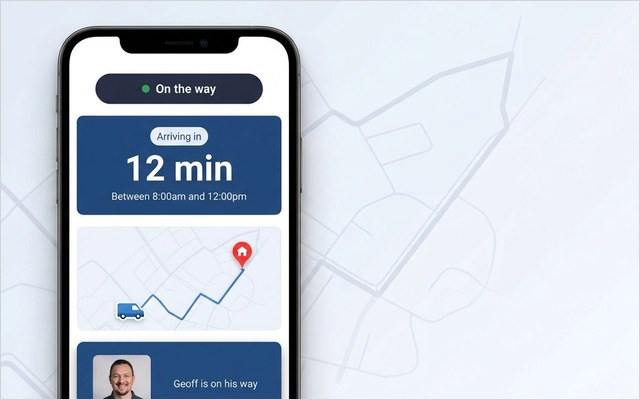
A customer-communication layer closes the gap with four capabilities that sit on top of your existing scheduling, all delivered through a browser portal with no app for the customer to install:
- Appointment tracking — a live ETA so the customer can watch the engineer approach instead of phoning to ask.
- Self-service rebooking — the customer moves their own visit in seconds, removing a whole category of contact-centre work.
- Automated reminders — SMS and email confirmations and day-before nudges that cut no-shows on work booked weeks earlier.
- Real-time feedback — an NPS or CSAT prompt straight after the visit, so a problem surfaces while it’s still fixable.
The results from enterprise deployments are consistent.
53% — the reduction in ETA-related calls to the contact centre that Bosch UK recorded after adding self-service tracking and rebooking on top of its existing WFM. The mechanism carries straight across to electrical service: give the customer visibility and control, and the calls and the chasing fall away.
There’s a first-visit dividend too. When the right circuit history, certificates and parts information reach the engineer before arrival, more jobs are fixed first time — and few things damage a customer’s experience (or your cost line) like a second or third trip for the same fault. Brinks Home improved appointment-based first-time job completion by 25% this way. The detail that drives it — digital notes and photos shared between office, engineer and customer — is also what moves a first-time fix rate of 76% toward the 87% the best operators reach.
How to choose an electrician software platform
The right choice depends almost entirely on your scale. Run through these questions in order.
- Sole trader or service operation? A solo electrician needs an all-in-one tool that replaces the diary, quote pad and certificate book; an operation with a field workforce needs software that integrates with the systems it already runs. Buying the wrong tier is the most common and most expensive mistake.
- How does it handle certification? Confirm it produces every certificate you issue (EICR, installation and minor works), enforces qualification checks in scheduling, and gives you a searchable audit trail. For a regulated, high-volume operation this is the floor.
- Does the mobile app work offline? If engineers lose data in a riser or on a rural site and can’t capture a certificate, the system stalls. Test it on a real job, not a demo with full signal.
- What does it do for the customer? Most platforms stop at the office and the engineer. Ask specifically about appointment tracking, self-service rebooking, reminders and feedback — the capabilities that cut no-shows and inbound calls. If it ignores the customer, you’ll need a customer-experience layer alongside it.
- Will it fit your existing stack? For larger operations, can it integrate cleanly with your WFM, ERP and contact centre without forcing you to abandon a scheduling engine that already works? The lower-risk path is to add the customer-facing layer on top rather than replace core software mid-operation.
If your work spans heating, gas or general plumbing alongside electrical, the same logic carries across the trades — see the companion guides to plumbing software and gas engineer software, where the certification differs but the customer-experience principles are identical. The office-side mechanics are covered in our guides to work order management and reusable job sheet templates.
Getting started
The lowest-risk way in isn’t a rip-and-replace. If you already run a platform that schedules and dispatches well, the gap is almost never the engineering side — it’s the customer side, and that bolts on without disturbing dispatch. On My Way is the customer-communication layer that does exactly that, through a browser portal the customer never downloads. See how it works, then book a demo and we’ll show it against your own appointment workload.
Frequently asked questions
What software do electricians use?
They use field-service or job-management software that handles scheduling and dispatch, gives engineers a mobile app for on-site job sheets, photos and test certificates (EICR, installation and minor works), and runs quoting, invoicing and job history in one place. At enterprise scale it integrates with a workforce-management system and adds a customer-communication layer for tracking and self-service rebooking.
What is the best job management software for electricians?
It depends on scale. For sole traders, an all-in-one tool that replaces the diary, quote pad and certificate book is usually right. For an operation with a sizeable field workforce, the better answer is software that integrates with your existing WFM and ERP, plus a customer-experience layer on top, rather than a tool that asks you to replace systems that already work. The wrong tier for your scale is the most expensive mistake.
Can electrician software produce EICR and test certificates?
Yes. Most electrical job management software lets a qualified engineer complete an EICR, installation certificate or minor works certificate on a mobile app, pre-filled with the property and circuit details, then generate, store and send it the same day. For a large operation the real value is the audit trail — a searchable record proving every inspection was carried out and every defect followed up.
Can you add customer communication without replacing your scheduling system?
Yes, and for a larger operation this is the lower-risk path. A customer-facing layer such as On My Way sits on top of whatever WFM you run, adding live tracking, self-service rebooking, automated SMS and email, and digital notes and photos through a browser portal — no app install, no disruption to dispatch.

The bottom line
Electrician software has matured on the engineering side — scheduling, mobile job sheets and digital certificates are well served. The gap most enterprise operations still carry is the customer side, and it’s where the cost actually sits: the inbound calls, the no-shows, and the avoidable return visits that drag a 76% first-time fix rate down. Adding a customer-communication layer on top of the WFM you already run closes that gap without a rip-and-replace.
References
- Aquant — 2024 Field Service Benchmark Report (average first-time fix rate 76%; top 87%, bottom 55%; a failed first visit averages 2.7 total visits and adds 13 days)
- On My Way / Leadent Digital — internal research, “the appointment problem” (30–40% of appointments changed by the customer, 10–15% cancelled; each change a 5–7-minute call).

Keep your WFM. Upgrade what your customers experience.
On My Way is the customer-experience layer for field service: live arrival tracking, self-service rebooking, notes and photos, and feedback — added on top of the scheduling system you already run. No rip-and-replace, live in 4–6 weeks.