On My Way vs Dynamics 365 Field Service: the customer self-service layer
Dynamics 365 Field Service fits naturally if you run on the Microsoft stack. But its customer self-scheduling has been documented as preview, single-resource only, and unable to change in-progress appointments. On My Way adds the full self-service layer on top of D365 — without touching how you schedule.
Compared on enterprise field service operations
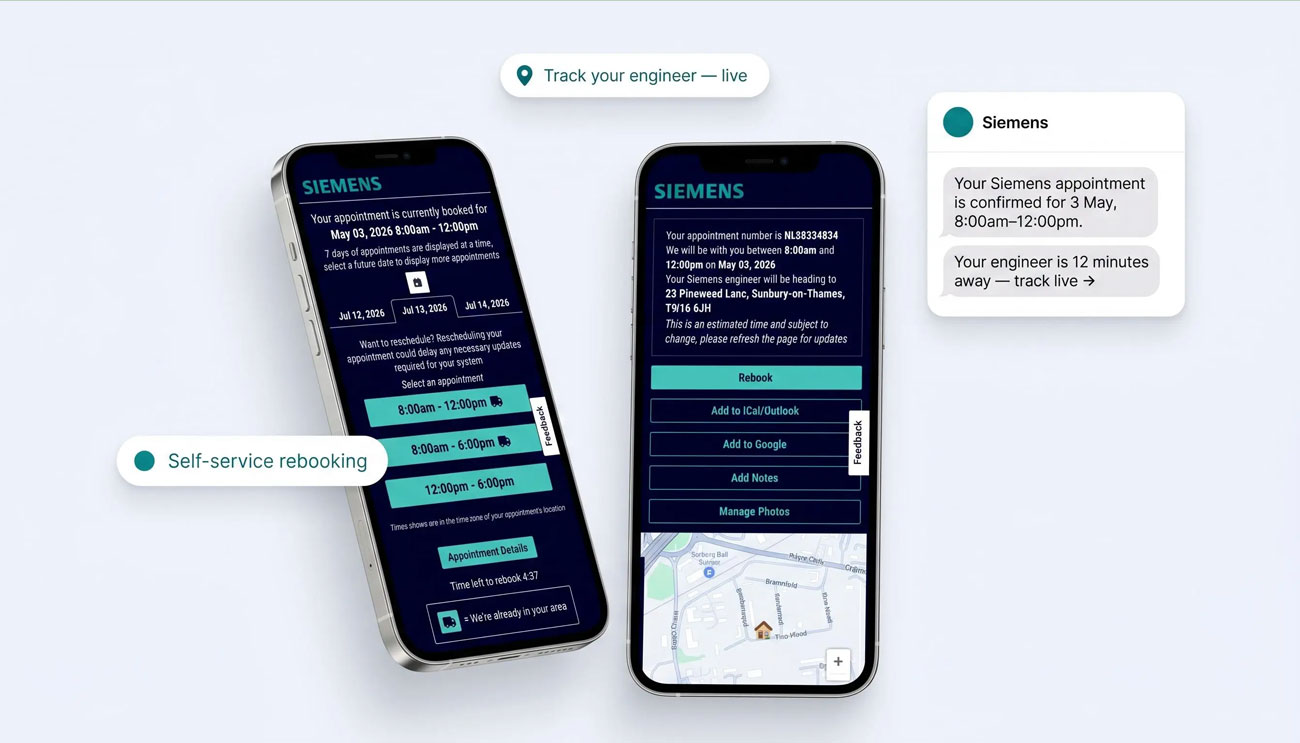
A dedicated customer-experience layer, running on top of Dynamics 365 Field Service.
A natural fit on the Microsoft stack — with a narrower self-service layer.
Dynamics 365 Field Service is a sensible choice for Microsoft-stack operations — it sits alongside Entra ID, the Power Platform and the wider estate, with scheduling and work orders well integrated. That fit is a genuine strength.
The native customer self-service is narrower than it first appears. Microsoft’s self-scheduling has been documented as preview, single-resource only, and unable to change in-progress appointments — fine for simple cases, but limiting for real-world rebooking, multi-resource jobs and day-of changes.
On My Way reads from Dynamics 365 via API and delivers a complete self-service layer as configuration: rebooking into optimised slots that writes back, branded two-way messaging, NPS, marketing and a contact-centre view. Being WFM-agnostic, the same experience travels if you ever run another scheduler.
Native D365 self-scheduling or a dedicated layer?
Where Dynamics is strong
If you run on the Microsoft stack, D365 Field Service fits with Entra ID and Power Platform. Keep it — On My Way layers on top.
What native self-scheduling does
Documented as preview, single-resource only, and unable to change in-progress appointments. Useful for simple cases.
Where On My Way adds value
Full self-service rebooking (incl. in-progress and multi-resource), branded comms, NPS and marketing as configuration — with a 35% call-deflection guarantee.
WFM-agnostic by design
Your WFM
Dynamics 365 Field Service
Keeps doing scheduling, dispatch and work orders — unchanged.
Middleware
On My Way
Syncs appointments via API and surfaces a branded customer layer.
Your customers
Self-service & tracking
Live ETA, rebooking, notifications and feedback — no app to install.
Dynamics 365 Field Service vs On My Way
| Capability | Dynamics 365 (native) | On My Way |
|---|---|---|
| Customer self-scheduling | Preview, single-resource only | Yes — full, multi-resource |
| Change in-progress appointments | Not supported (documented) | Yes |
| Self-service rebooking into optimised slots | Limited | Yes — optimised slots, writes back to D365 |
| Real-time technician tracking & ETA | Varies | Yes — real-time, map-based |
| Branded SMS & email notifications | Add-on / Power Platform build | Built-in, fully branded, two-way |
| NPS & feedback per visit | Build | Yes — every work order |
| In-appointment marketing | No | Yes |
| Configurable branding / white-label | Limited | Fully configurable, no code |
| Contact-centre agent view | Within Dynamics | Yes — unified live status |
| Works across multiple WFMs | Dynamics only | Yes — WFM-agnostic |
| Survives a WFM change | Lost if you migrate | CX & data stay with On My Way |
| Time to deploy | Varies with build | 4–6 weeks, configured |
| Call-deflection guarantee | None | 35% in 90 days |

Past the limits of preview self-scheduling
Real rebooking is multi-resource, day-of, and writes back to the schedule.
Single-resource, no-in-progress-changes self-scheduling covers the simplest cases. Real operations need customers to move multi-resource jobs, change appointments already in progress, and have every change write back cleanly to the schedule — without a Power Platform build to get there.
On My Way delivers that on top of Dynamics 365 as configuration: full self-service rebooking into optimised slots, branded comms, NPS and a live ETA — and the same experience runs on any other scheduler you operate.
What On My Way adds over the native portal
Self-service rebooking
Customers move an appointment to a greener slot themselves — cutting no-shows and inbound calls, writing back to your scheduler.
Real-time tracking & ETA
A live ETA and map so customers stop calling to ask where the engineer is.
Automated notifications
Branded SMS and email confirmations and reminders that lift attendance.
NPS & feedback
Capture satisfaction on every visit and route detractors to your team fast.
In-appointment marketing
Promote services, plans and offers inside the tracking experience customers open.
Contact-centre view
Agents see the same live status as the customer, deflecting “where is my engineer?” calls.
Adding On My Way to Dynamics 365 Field Service
Connect to Dynamics
On My Way connects to Dynamics 365 Field Service via API — appointments, work orders and technician status sync automatically. No rip-and-replace.
Configure your experience
Brand the customer portal, set notification and rebooking rules, and choose exactly what data flows — no Power Platform build.
Go live in 4–6 weeks
Launch on top of D365 with full self-service — no disruption to dispatch, and a 35% call-deflection guarantee.
Enterprise-ready, with zero disruption to Dynamics 365 Field Service
On My Way reads from Dynamics 365 Field Service through its API and never becomes your system of record — your scheduler stays the source of truth.
SSO via Microsoft Entra ID
Single sign-on for your team, with role-based access to the On My Way console.
Passcode-protected access
Customer portal links are passcode-protected, so appointment data stays private.
Encrypted in transit
All data moving between Dynamics 365 Field Service and On My Way is encrypted end to end.
GDPR & works-council ready
Built to meet GDPR and European works-council requirements out of the box.
No custom development
Integration is configuration, not construction — nothing bespoke to build or maintain.
API-first, zero disruption
Dispatchers keep working in Dynamics 365 Field Service exactly as they do today.
Proven on enterprise field service operations.
On My Way runs on top of enterprise WFM platforms at scale. Across Bosch, Foxtel and E.ON deployments the customer-experience layer delivers the outcomes below — using only each client’s own approved results.
53%
Bosch — ETA call reduction
38%
Foxtel — no-show reduction
19%
E.ON — first-time fix uplift
“
Native self-scheduling was preview and single-resource, so it never covered our real rebooking. On My Way gave customers full self-service on top of Dynamics — without a Power Platform project.
Head of Field Service Operations, enterprise telecom provider
The verdict in four lines
- Dynamics 365 Field Service is a natural fit for Microsoft-stack operations — keep it.
- Native self-scheduling is documented as preview, single-resource, and cannot change in-progress appointments.
- On My Way adds full self-service rebooking, branding, NPS and marketing as configuration.
- It is WFM-agnostic and backs the result with a 35% call-deflection guarantee in 90 days.
The On My Way guarantee
Hit 35% call deflection in 90 days — or we work for free until you do.
We are confident enough in the field service customer experience to put our fee on the line.
Book a demo →Frequently asked questions
Does On My Way replace Dynamics 365 Field Service?
No. On My Way is WFM-agnostic and sits on top of Dynamics 365 Field Service via API. D365 keeps doing scheduling and work orders; On My Way adds the customer self-service layer. Your dispatchers keep working in Dynamics exactly as they do today.
What are the documented limits of D365 self-scheduling?
Microsoft’s customer self-scheduling for Dynamics 365 Field Service has been documented as preview, single-resource only, and unable to change in-progress appointments. It is real native capability, but narrower than a dedicated self-service layer.
Is Dynamics 365 a good fit for Microsoft-stack shops?
Yes. If you run on the Microsoft stack, Dynamics 365 Field Service fits naturally with Entra ID, Power Platform and the rest of the estate. On My Way complements it — and uses Microsoft Entra ID for SSO too.
Can customers reschedule into optimised slots?
Yes. On My Way offers self-service rebooking into optimised slots that writes back to your Dynamics 365 schedule, including changes the native preview self-scheduling does not cover — reducing no-shows and inbound calls.
Does On My Way work outside Dynamics too?
Yes. It is WFM-agnostic, so the same customer experience runs on Oracle Field Service, IFS, Salesforce FSL, SAP or ServiceMax — useful if you run more than one scheduler.
How long does it take to go live?
Typically 4–6 weeks, configured on top of your existing Dynamics 365 Field Service with no disruption to dispatch — backed by a 35% call-deflection guarantee in 90 days.
Add a customer layer to Dynamics 365 Field Service
See On My Way running on top of D365 — full self-service rebooking, branded comms and a live ETA, with a 35% call-deflection guarantee.